


Modern e-commerce stores demand blistering frontend speeds alongside powerful cloud-based features such as AI review summarization, automated email delivery pipelines, multi-criteria analytics, and multi-store management. ReviewX achieves this through a state-of-the-art hybrid architecture: a lightweight, high-performance WordPress client coupled with a robust cloud SaaS backend.
Thank you for reading this post, don't forget to subscribe!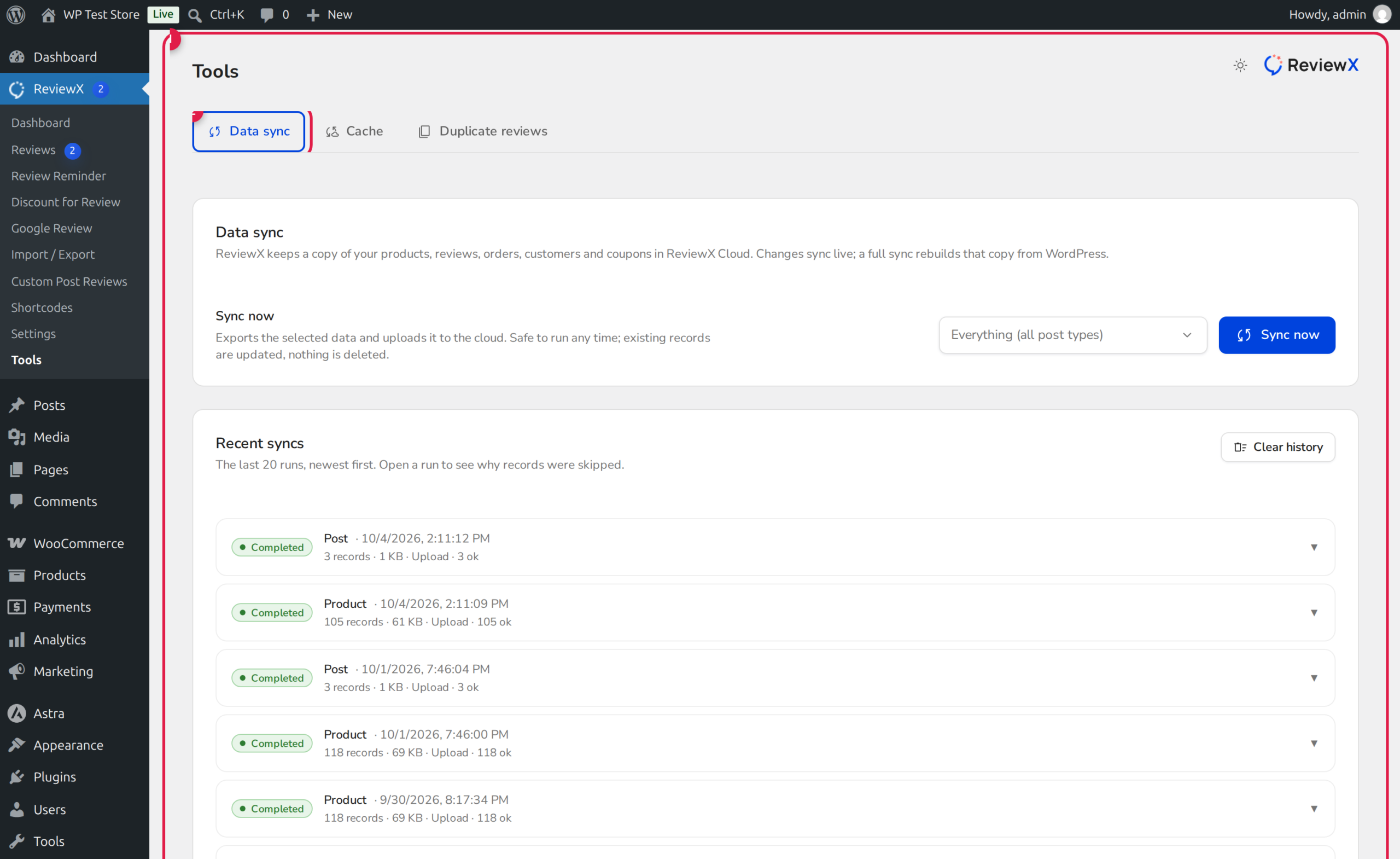
The Best of Both Worlds: Local Ownership + Cloud Power
All review comments, media attachments, and customer ratings remain stored locally in your WordPress MySQL database (in wp_comments and wp_commentmeta), ensuring complete data ownership. The SaaS cloud manages heavy computational tasks such as automated email reminders, quota tracking, AI sentiment analysis, and multi-criteria aggregations.
What Data Synchronizes Between WordPress and the SaaS Cloud?
| Data Entity | Sync Direction | Purpose in ReviewX Architecture |
|---|---|---|
| Products & Post Types | WordPress → SaaS | Synchronizes titles, permalinks, featured images, and prices for email reminder rendering. |
| Customer Orders | WordPress → SaaS | Detects completed orders to calculate reminder delivery delays and recipient queues. |
| Reviews & Ratings | Bi-directional (↔) | Keeps review statuses (approved, pending, spam), star counts, and replies synchronized across surfaces. |
| Discount Coupons | Bi-directional (↔) | Synchronizes generated promotional codes and tracks single-use redemption status. |
Real-Time Webhooks vs Manual Batch Synchronization
Under normal operational conditions, data synchronizes in real-time via automated WordPress action hooks (such as woocommerce_order_status_completed, comment_post, and wp_update_comment). However, if your server experienced downtime, migration, or temporary network interruptions, you can initiate a manual synchronization:
Step-by-Step Guide: Running a Manual Data Sync
Step 1: Open the Tools Center
Navigate to ReviewX → Tools in your WordPress administrative menu and click on the Data sync tab (marked with Badge 1).
Step 2: Inspect Sync Status
Review the synchronization summary cards. Each card displays the current synchronization status, total record count, and last sync timestamp for Products, Orders, and Reviews.
Step 3: Trigger Synchronization
Click the Sync now button (Badge 2). ReviewX securely packages local delta changes and transmits them in batches to the cloud SaaS API.
Step 4: Verify Completion
Upon completion, a green confirmation badge indicates all records are in parity. The storefront widget cache is automatically cleared so visitors immediately see the latest updates.


