


While WooCommerce powers millions of online stores selling physical and digital goods, modern WordPress websites often require review systems for completely different content types. Whether you operate a real estate portal listing properties, a directory reviewing local services, a portfolio showcasing creative client projects, or a library of recipes, collecting structured customer feedback is essential for establishing credibility.
Thank you for reading this post, don't forget to subscribe!ReviewX is not limited to WooCommerce products. Built with an extensible post-type architecture (app/CPT/CptHelper.php), ReviewX seamlessly attaches its full suite of review tools — including multi-criteria rating sliders, photo and video attachments, verified badges, and filtering widgets — to any registered WordPress Custom Post Type (CPT).
1. Custom Post Type Architecture in ReviewX
ReviewX automatically inspects your WordPress environment to discover public custom post types registered by plugins, themes, or custom code (such as CPT UI, ACF, or Pods). When you activate ReviewX on a custom post type, you unlock:
- Independent Criteria Configurations: Configure unique evaluation dimensions per post type. For example, a Course can be rated on Curriculum and Instructor, while a Real Estate Listing is rated on Location and Amenities.
- Granular Submission Permissions: Choose whether anyone or only registered users can submit reviews on specific post types.
- Rich Media & Filtering: Enable photo and video review uploads and display interactive sorting/filtering widgets on single post templates.
- Native Comments Integration: Reviews are stored as clean WordPress comments linked to the post ID, ensuring 100% database persistence and compatibility.
2. Step-by-Step Guide: Enabling Reviews on Any CPT
Follow these steps to activate ReviewX on your custom post types:
- From your WordPress dashboard, navigate to ReviewX → Custom Post Reviews (
admin.php?page=reviewx_cpt_review). - You will see a list of detected post types (such as Products, Downloads, Courses, Portfolios, or custom items).
- Click the Add post type button in the top-right corner to open the selection modal.
- Choose your desired custom post type from the searchable dropdown menu.
- Click the Settings (Gear) icon next to your added CPT to configure:
- Review Criteria: Define multi-criteria rating categories specific to this post type.
- Photo & Video Reviews: Toggle media attachment allowances.
- Auto Approval: Configure moderation rules for new submissions.
- Click Save to activate the review system on that post type.
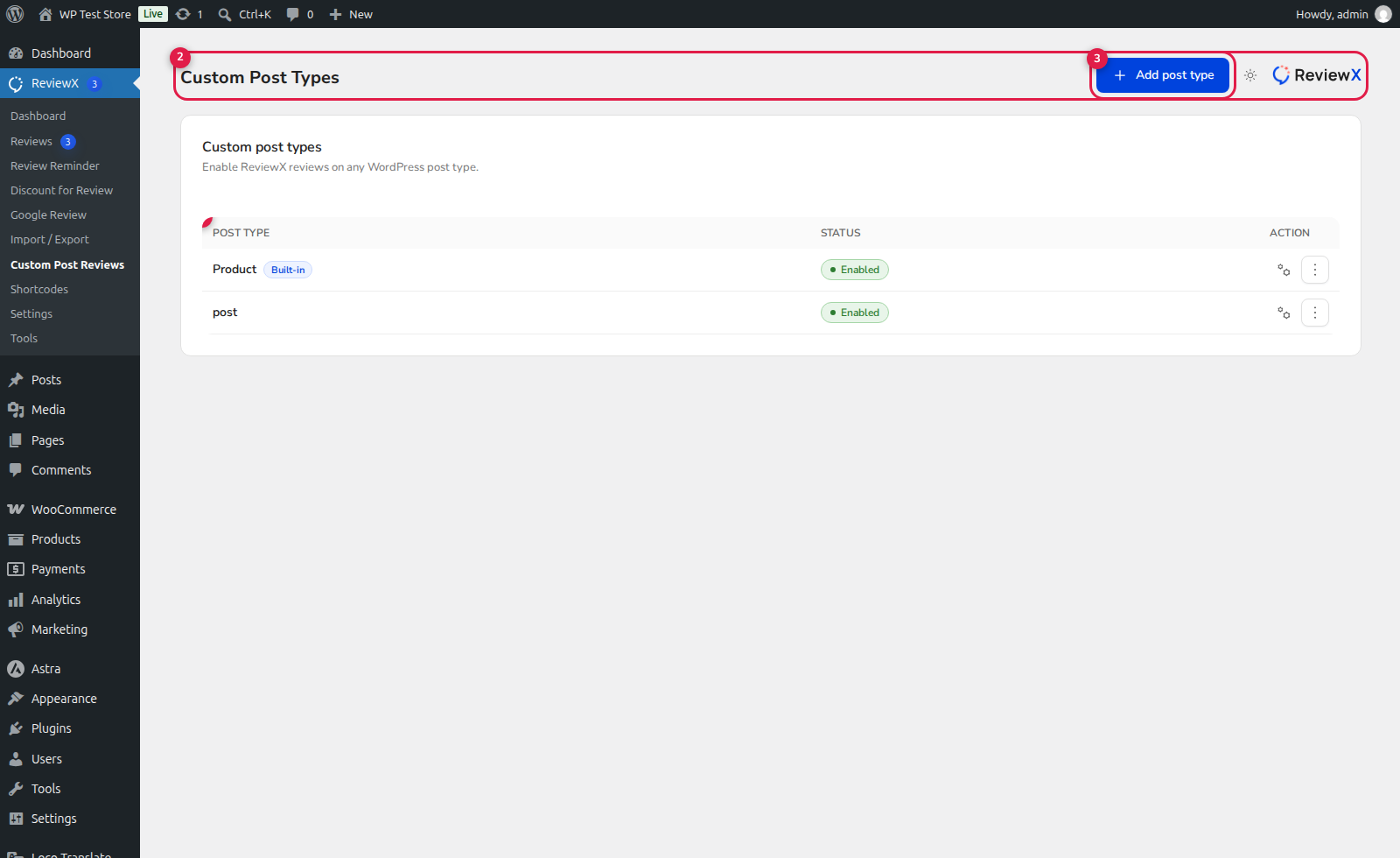
(1) Custom Post Type Table: Directory of active post types with individual review counts and status toggles.
(2) CPT Settings & Criteria: Configure post-type specific criteria ratings, photo/video settings, and auto-approval.
(3) Add Post Type: Search and activate reviews for newly registered CPTs.
3. Displaying Reviews on Custom Post Templates
ReviewX provides three flexible methods for rendering reviews on your custom post layouts:
- Automatic Single Template Integration: If your active theme calls
comments_template()insidesingle-{post_type}.php, ReviewX automatically replaces the default comment box with the modern ReviewX review form and list. - The
[rvx-review-list]Shortcode: Embed the review list anywhere on your single post template or landing page:[rvx-review-list post_type="portfolio" filter="on" per_page="10"] - Elementor CPT Review Widget: If building single templates with Elementor Theme Builder, search for the ReviewX CPT Review widget and drag it directly into your layout.


