


Delivering discount coupons with attractive formatting, professional branding, and clear redemption instructions ensures customers notice and redeem their rewards. ReviewX provides a dedicated email template customizer under ReviewX → Discount for Review that allows you to tailor both the actual reward delivery email and the promotional teaser message embedded in review invitations.
Thank you for reading this post, don't forget to subscribe!With support for custom header banners, rich text editing, dynamic merge placeholders, and one-click cart apply buttons, you can maintain seamless brand consistency across all transactional customer touchpoints.
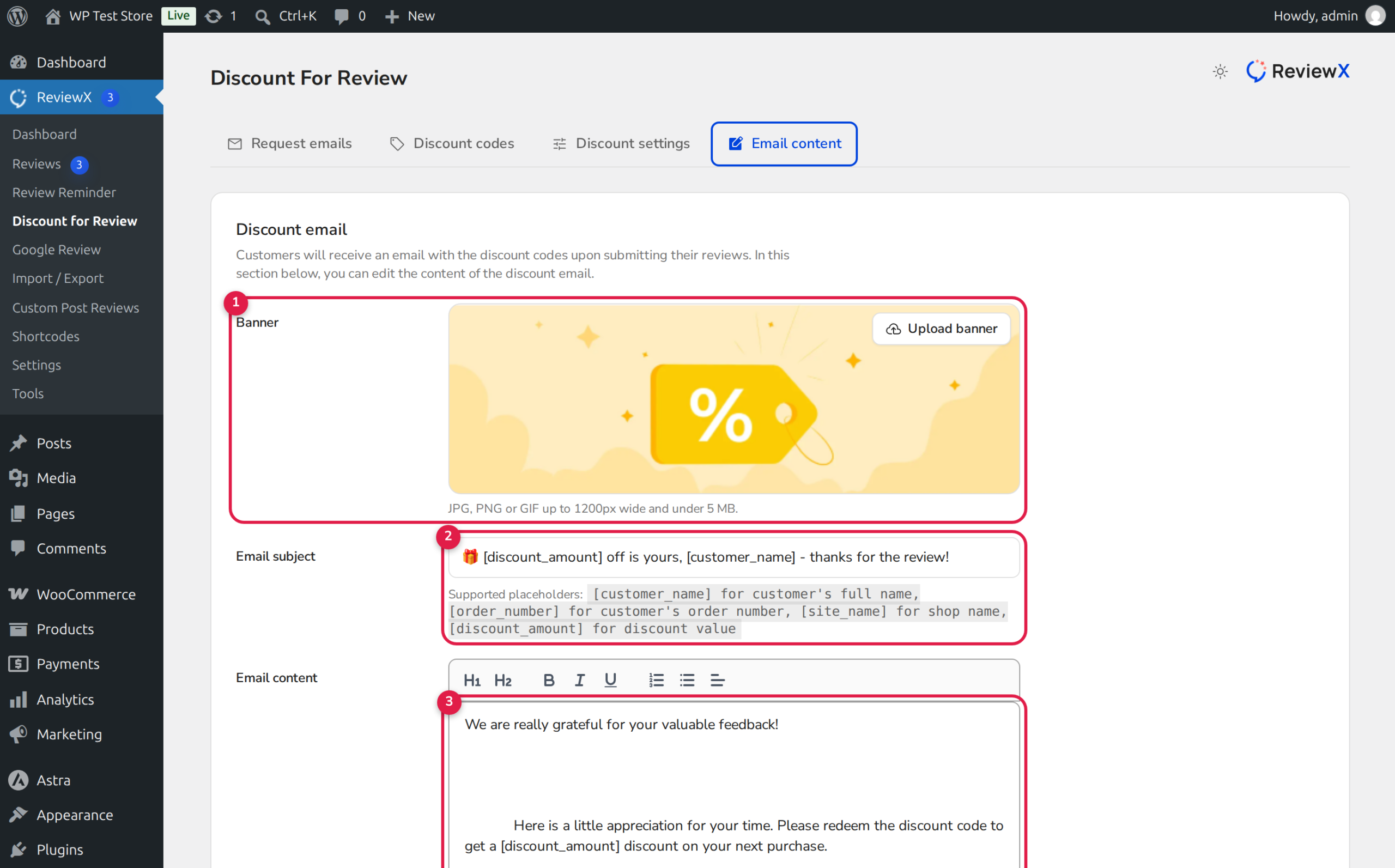
Two Distinct Customization Sections
The Email content tab configures two separate email elements:
1. Discount Email: The standalone transactional email sent immediately after review submission containing the customer’s actual coupon code.
2. Discount Message for Review Reminder Email: A motivational teaser paragraph inserted inside regular review reminder emails to announce the available reward.
Customizable Elements in the Discount Email Editor
As highlighted in the annotated interface above, you have full control over the visual presentation and copy of your reward emails:
- 1. Promotional Header Banner: Upload a celebratory graphic (JPG, PNG, or GIF up to 1200px wide and under 5 MB) thanking the customer for their review.
- 2. Personalized Email Subject: Craft an enticing subject line that announces the reward immediately (e.g., “Here is your [discount_amount] discount code, [customer_name]!”).
- 3. Rich Body Content & Coupon Block: Write a warm note of gratitude and embed the dynamic
[discount_code]placeholder so the recipient can copy their coupon with ease. - 4. Call-to-Action Button: Define the button text (e.g., “Shop Again & Save”) that links directly to your store checkout or shop page.
- 5. Send Test Mail & Save: Dispatch a real test email to your inbox to verify formatting across desktop and mobile email clients before publishing.
Supported Email Merge Placeholders
ReviewX automatically replaces template placeholders with live transaction data when delivering discount emails:
| Placeholder | Description | Example Rendered Output |
|---|---|---|
| [customer_name] | Recipient’s first and last name from billing information | David Miller |
| [order_number] | WooCommerce order number associated with the review | #5812 |
| [site_name] | Store title configured in WordPress General Settings | Nordic Outdoors |
| [discount_amount] | Formatted percentage or currency discount value | 20% OFF |
| [discount_code] | The unique or universal WooCommerce coupon code | RVX-9K2M-4P8Q |
Step-by-Step Guide: Customizing Your Discount Email
Step 1: Open the Discount Email Customizer
In your WordPress admin menu, navigate to ReviewX → Discount for Review and click on the Email content tab.
Step 2: Upload a Header Banner
Click Upload banner in the Discount email card. Select an image with your brand colors that celebrates customer reviews (recommended size: 1200 x 400 pixels).
Step 3: Personalize the Subject and Message Body
Review the default copy and customize it to match your brand voice. Ensure that [discount_code] is clearly highlighted in bold or centered within the body so customers can locate it effortlessly.
Step 4: Configure the Reminder Teaser Message
Scroll down to the Discount message for review reminder email section. This short message is inserted into reminder emails to incentivize buyers to leave feedback. For example:
Submit your review today and receive a [discount_amount] discount coupon on your next order with [site_name]!
Step 5: Test and Save
Enter your email address in the Send test mail field and click the button. Check your inbox to confirm that images load, text formatting is clean, and the button functions properly. Click Save to apply your changes live.
Automated 1-Click Cart Redemption
To eliminate checkout friction, ReviewX includes an automated redemption link in the discount email CTA button. When clicked, it routes through the ReviewX Portal:
https://portal.reviewx.io/discount-apply?code={coupon_code}&site={site_uid}
The endpoint posts the coupon code directly to WooCommerce REST API /discount/wp/apply, executing:
WC()->cart->apply_coupon( $code );
The customer arrives on your store checkout with the discount already applied and calculated in their order subtotal.
Frequently Asked Questions
Can I customize the store logo shown in the email header?
Yes. The store logo displayed at the top of all Review Reminder and Discount for Review emails is configured under ReviewX → Settings → General Settings → Shop Logo.
What happens if I forget to include the [discount_code] tag in the email body?
If the [discount_code] tag is missing from the template body, ReviewX automatically appends a dedicated coupon card block below your text so the customer always receives their reward code.
Can I send emails using my own custom domain or SMTP server?
Yes. ReviewX supports custom SMTP integration. Go to ReviewX → Settings → Email Settings → Custom SMTP and enter your credentials. ReviewX will deliver all reminders and discount emails directly through your custom server.


