


Store owners migrating from Shopify or third-party review platforms (such as Loox, Yotpo, AliReviews, or Stamped.io) often fear losing years of hard-earned customer social proof. With ReviewX’s universal CSV import system, you can migrate thousands of customer testimonials, star ratings, and buyer details into WooCommerce in minutes.
Thank you for reading this post, don't forget to subscribe!This tutorial provides the exact column mapping and migration workflow for Loox, Yotpo, and AliReviews exports.
Step 1: Export Reviews from Your Existing App
- From Loox: In your Loox admin, navigate to Settings → Manage reviews → Export all reviews. Download the CSV.
- From Yotpo: In Yotpo dashboard, go to Reviews → Moderation → Export Reviews. Select full CSV export.
- From AliReviews: In AliReviews, go to Reviews → Manage → Export to CSV.
Step 2: Map Headers to the ReviewX Template
ReviewX requires standardized column headers so it can accurately pair reviews with WooCommerce products. Open the ReviewX sample template (downloadable from ReviewX → Import / Export) and map your exported data:
| ReviewX Header | Loox Header | Yotpo Header | AliReviews Header |
|---|---|---|---|
Product ID / SKU |
product_handle |
product_id / sku |
product_sku |
Rating |
rating |
review_score |
star_rating |
Review Content |
review |
review_content |
content |
Reviewer Name |
author |
display_name |
author_name |
Reviewer Email |
email |
user_email |
author_email |
Date |
created_at |
date |
created_at |
Step 3: Execute the Bulk Import
- Go to ReviewX → Import / Export in your WordPress admin.
- Under the Import tab, upload your mapped CSV file.
- Check Auto publish to immediately activate imported reviews on your live product pages.
- Check Mark as verified to reward the verified buyer badge.
- Click Import now.
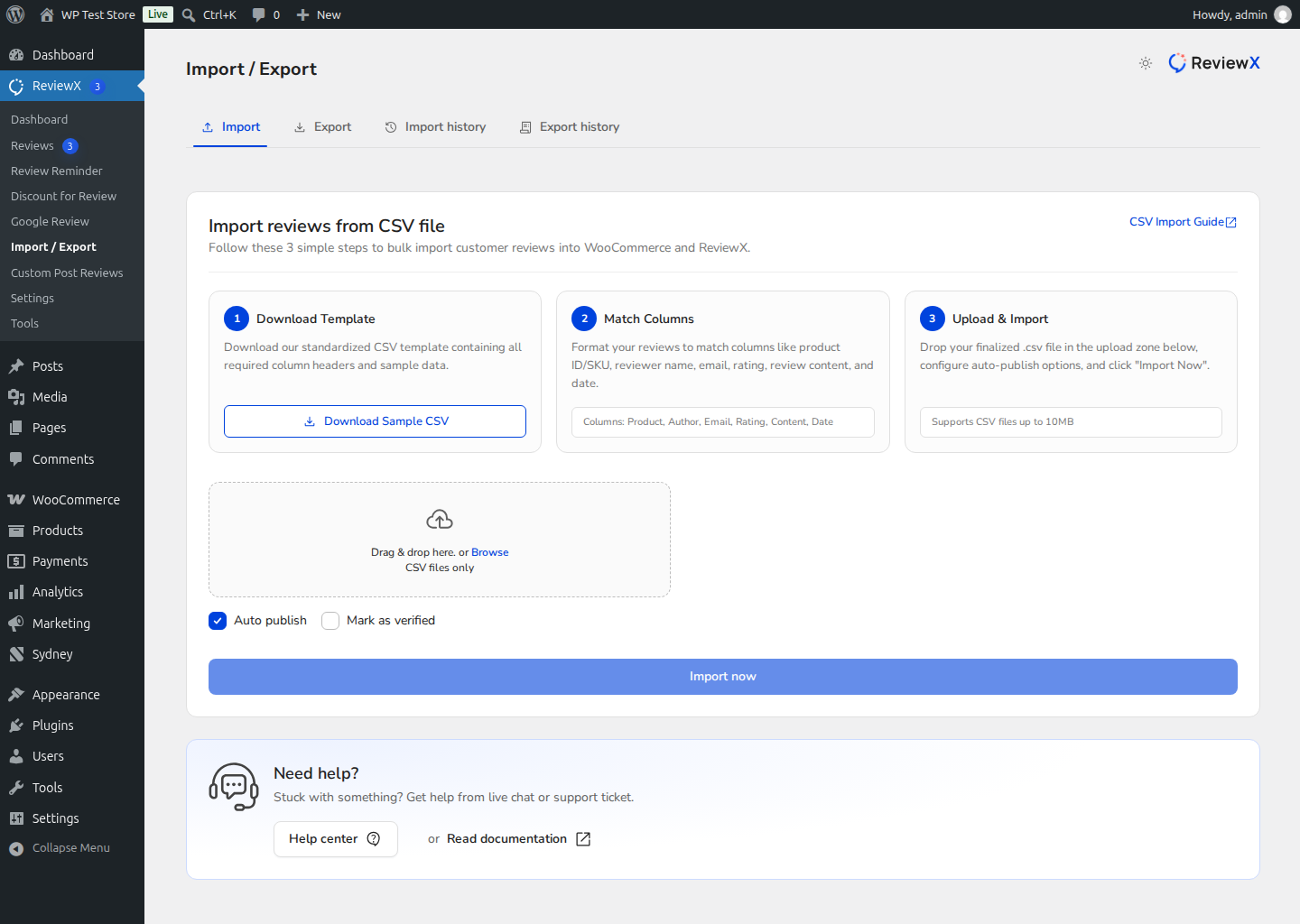
Figure 1: ReviewX bulk import tool facilitating instant cross-platform review migration.
Step 4: Flush Cache & Confirm Live Display
Once the import reports 100% completion, navigate to ReviewX → Tools → Cache Management and flush your transients. Open any product that received imported reviews to verify that ratings, buyer names, and testimonials render beautifully.


