


When you link ReviewX to your SaaS account, the system initiates an automated background data synchronization process. This sync establishes the secure pipeline that powers automated email reminders, coupon delivery, and fast cloud-backed review indexing.
Thank you for reading this post, don't forget to subscribe!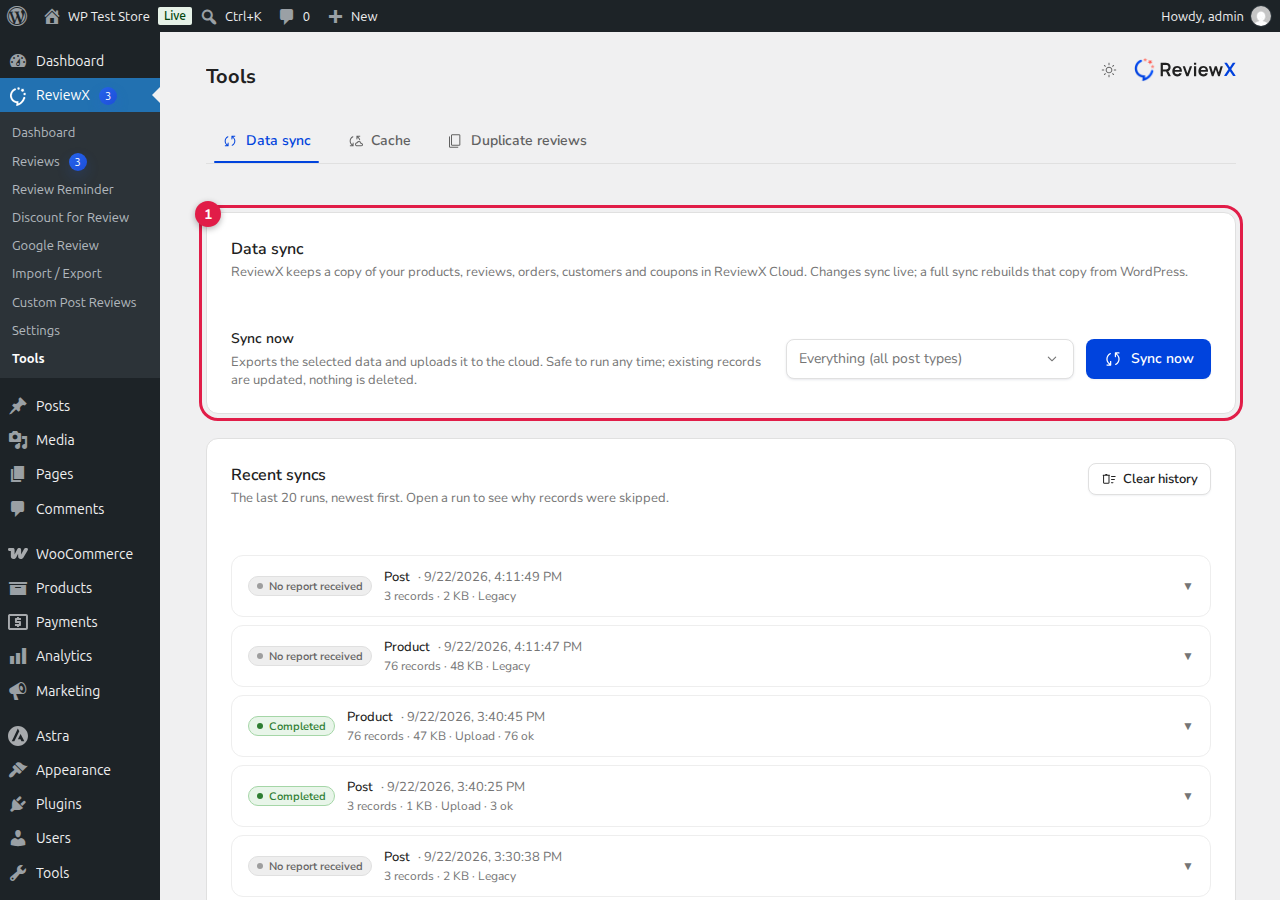
What Data is Synchronized?
The initial sync securely connects several core WooCommerce data sets with your ReviewX cloud workspace:
- Products & Categories: Product IDs, titles, SKUs, and thumbnails are cataloged so customer reviews and reminders map to the correct items.
- Existing Reviews & Ratings: Any historical reviews already in your WordPress database are imported and structured with multi-criteria metadata.
- Order History & Customer Verification: Past orders are indexed so ReviewX can automatically recognize verified buyers and trigger review reminders at the right fulfillment intervals.
Monitoring and Managing Sync Status
You can check the live status of your synchronization at any time by navigating to ReviewX → Tools:
- The Data Sync section displays the total number of synced products and orders.
- If you ever make bulk changes to your product catalog or import historical data outside ReviewX, you can click Re-sync to manually trigger a fresh sync run.
- The sync runs asynchronously in small batches, ensuring zero impact on your storefront page load speed or customer checkout experience.


