


Review submission policies dictate who is permitted to review your products, how reviews are verified and approved, and what multimedia content customers can attach.
Thank you for reading this post, don't forget to subscribe!Accessing Review Settings
- From your WordPress admin dashboard, navigate to ReviewX → Reviews.
- Click the Review settings tab at the top of the page.
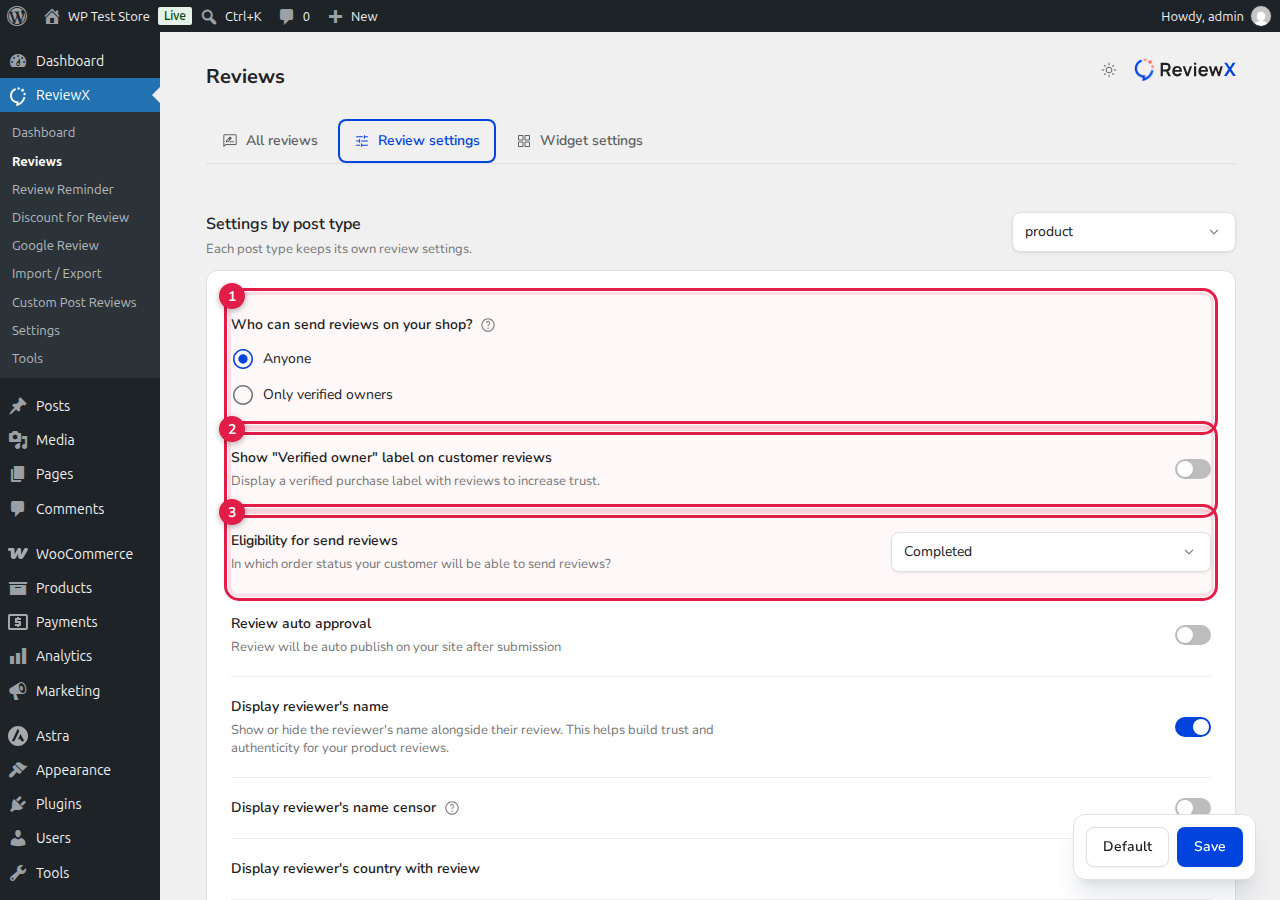
Configuring Key Submission Policies
- [1] Who can send reviews on your shop: Choose between Anyone (any visitor can review) or Only verified owners (only verified purchasers can review).
- [2] Show “Verified owner” label on customer reviews: Toggle this switch to display a prominent “Verified Purchase” trust badge beside reviews from confirmed buyers.
- [3] Eligibility for send reviews: Select the exact WooCommerce order status required for customers to be eligible to submit reviews (e.g. Completed or Processing).
- Review auto approval: When enabled, submitted reviews publish immediately. When disabled, reviews enter the Pending moderation queue for manual admin review.
- Photo & Video Reviews: Toggle Allow photo reviews and Allow video reviews to let customers attach visual media.
- Display Reviewer Name & Country: Control reviewer attribution, including the Censor reviewer name option to protect customer privacy.
- Multi-Criteria Reviews: Enable multi-criteria ratings and define the specific criteria (e.g. Quality, Price, Value) for your products.
- reCAPTCHA: Enable spam protection using either built-in Math-based reCAPTCHA or Google reCAPTCHA.
- Reviews per page: Define the pagination limit for your storefront review list (1–100 reviews per page).
After adjusting your options, click Save at the bottom of the page to apply the policies instantly across your store.


