


In standard WordPress and WooCommerce setups, customer reviews are treated like generic blog comments — scattered across the default Comments screen or hidden within individual product pages. ReviewX modernizes this workflow by replacing the fragmented native comment system with a dedicated, purpose-built review management center.
Thank you for reading this post, don't forget to subscribe!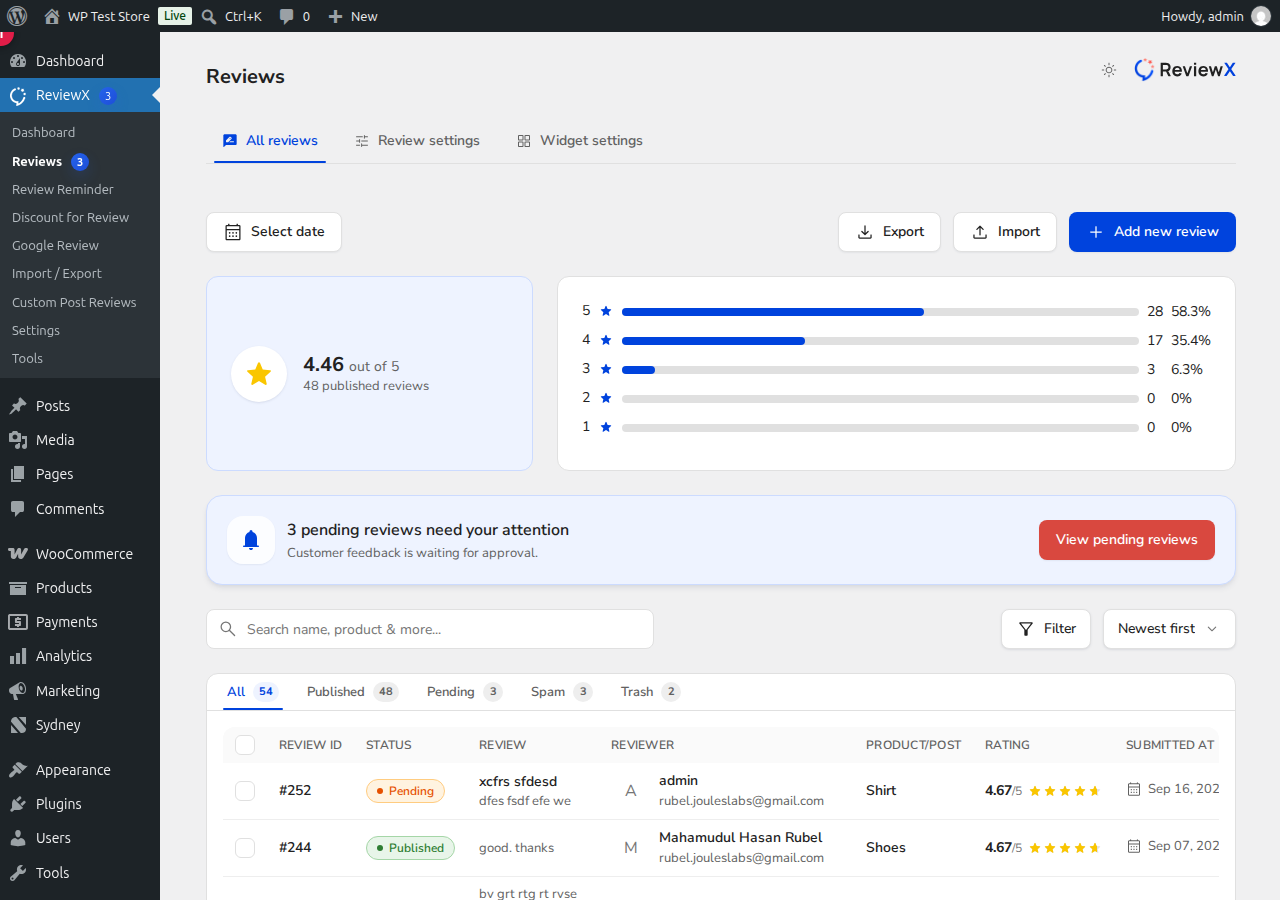
How ReviewX Replaces Legacy Comments
When you activate ReviewX for your WooCommerce store:
- Dedicated Review Console: All feedback is organized in ReviewX → Reviews → All reviews, featuring real-time rating distribution bars, status filters (All, Published, Pending, Spam, Trash), and quick search.
- Automated Redirection Notice: If you navigate to WooCommerce’s default review screen (Products → Reviews or
edit-comments.php?comment_type=review), ReviewX displays an informative notification informing administrators that reviews are now managed through ReviewX, with a one-click button redirecting to the centralized interface. - Rich Data at a Glance: Each row in the ReviewX table displays comprehensive metadata — Review ID, status badge, full review excerpt, reviewer name and email, product title, numerical star rating, and submission timestamp.
Instant Side-Drawer Moderation
Rather than opening separate editing screens, clicking any review opens the ReviewX Moderation Drawer directly on the right side of the screen. Store administrators can immediately adjust ratings, correct typos, verify customer purchase status, or post an official public store reply without losing their place in the review list.


