


While WooCommerce product reviews are essential for e-commerce, modern WordPress websites frequently showcase custom content that requires social validation—such as online courses, portfolio case studies, directory listings, downloadable software, and real estate properties. ReviewX provides first-class support for Custom Post Types (CPT), allowing you to collect ratings, enable multi-criteria evaluations, and inject structured schema markup into any registered post type across your WordPress site.
Thank you for reading this post, don't forget to subscribe!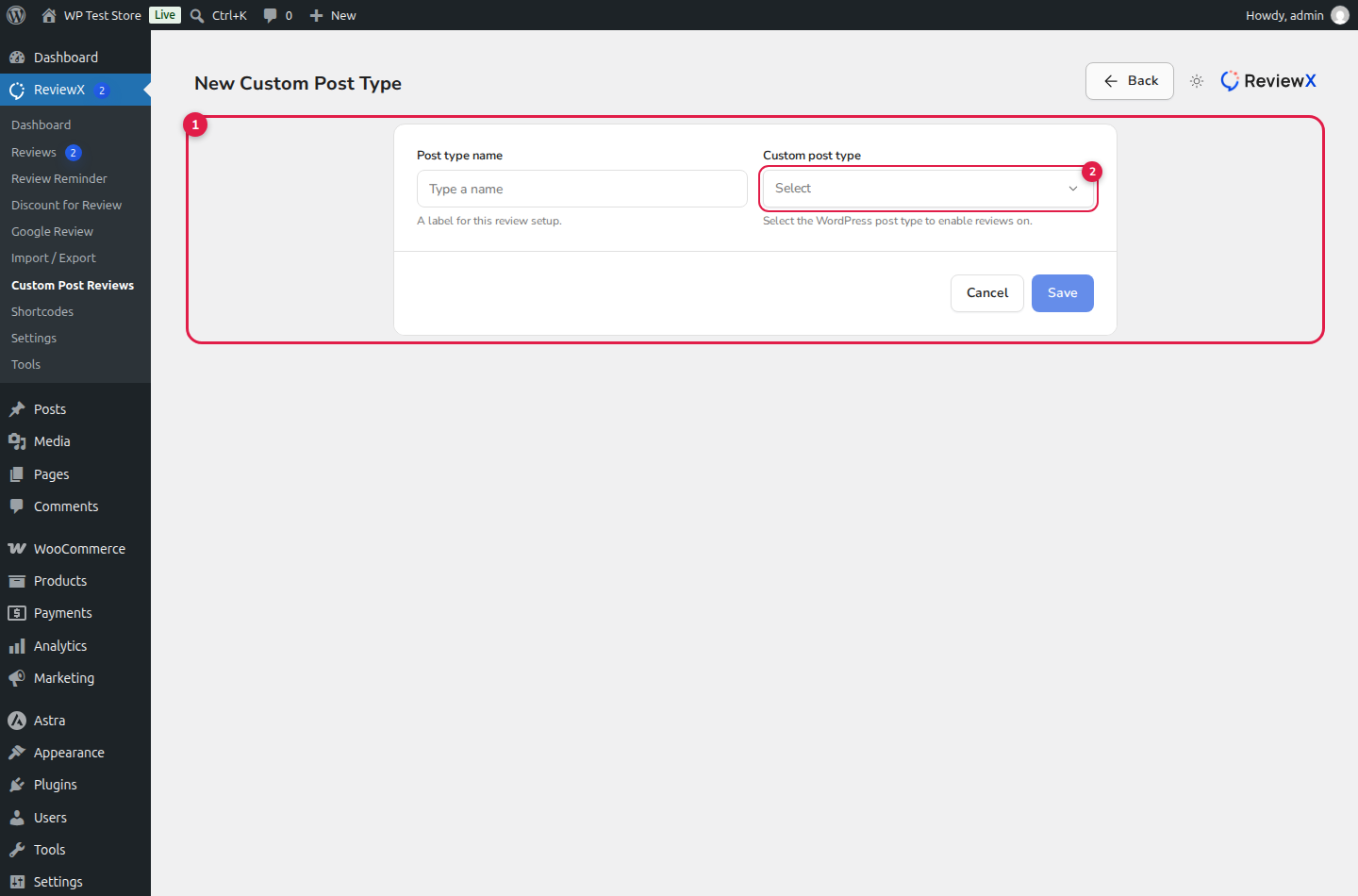
Full Feature Parity for Custom Content
Custom Post Type reviews in ReviewX inherit the full power of the platform: multi-criteria ratings, photo/video attachments, Google rich snippet schema, review voting, and customizable review forms.
Step-by-Step Guide: Adding Reviews to a Custom Post Type
Step 1: Open the Custom Post Reviews Center
In your WordPress sidebar, navigate to ReviewX → Custom Post Reviews. Click the Add post type button (marked with Badge 1) in the top right corner.
Step 2: Select Your Target Post Type
In the expanded creation form, locate the Post Type dropdown (marked with Badge 2). ReviewX automatically detects and lists all publicly queryable post types registered on your site (e.g. portfolio, courses, downloads, books, listings). Select the post type you wish to enable reviews for.
Step 3: Configure Schema Type & Display Settings
Customize the behavior of the review module for this specific post type:
- Schema Entity Type: Select the Schema.org object that matches your content: Article, Course, Service, SoftwareApplication, or Product. ReviewX will automatically output valid JSON-LD rich snippets.
- Form Position: Choose whether the review form renders before the review list, after the review list, or via shortcode/Elementor widget.
- Enable Multi-Criteria: Assign unique rating criteria tailored specifically to this post type (e.g., for an online course: Content Quality, Instructor Support, Value).
Step 4: Save & Publish
Click Save changes. ReviewX will immediately activate customer reviews on all single posts of that custom post type.
Displaying CPT Reviews via Shortcodes & Elementor
If your custom post type uses a custom page builder template (Elementor Pro Theme Builder, Divi, or Gutenberg), you can place ReviewX widgets anywhere in your layout:
- Review List Shortcode:
[rvx-woo-reviews post_type="your_cpt_slug"] - Review Form Shortcode:
[rvx-review-form post_type="your_cpt_slug"] - Elementor Native Widget: Drag and drop the ReviewX CPT Widget directly into your Elementor Single Post template.


