


Automated review reminder emails are the single most effective driver of verified customer testimonials for WooCommerce stores. Because ReviewX operates on a high-performance cloud SaaS architecture, all email scheduling, queue management, and outbound dispatches are handled directly by the ReviewX SaaS Cloud engine—completely independent of WordPress background jobs or native WP-Cron.
Thank you for reading this post, don't forget to subscribe!When review reminders or discount reward emails fail to deliver as expected, the root cause is almost always linked to data synchronization, order status eligibility, monthly plan quotas, or custom SMTP configurations. This guide details how the ReviewX cloud email engine operates and how to diagnose and resolve delivery issues directly from your WordPress admin dashboard.
Cloud-Native Queuing (Zero Dependency on WP-Cron)
ReviewX does not rely on WordPress Cron (wp-cron.php) to trigger reminder or discount emails. When an order completes on your store, WordPress immediately notifies the ReviewX SaaS Cloud via real-time event webhooks. The SaaS infrastructure manages the delivery countdown timer, queues the email in its distributed cloud queue, and executes the dispatch reliably at the exact scheduled second regardless of visitor traffic to your store.
How Review Reminder & Discount Emails Work Across the Architecture
Understanding the interplay between your local WordPress store and the ReviewX Cloud clarifies where delivery bottlenecks occur:
- Order Event Capture: When a customer places an order and it transitions to qualifying status (e.g.
Completed), the ReviewX event listener (woocommerce_order_status_changedinHooks.php) enqueues anOrdersync payload. - Cloud Synchronization: At request shutdown, the local Dispatcher securely transmits the order payload—including customer billing email, line item IDs, product titles, and timestamps—to the ReviewX Cloud API.
- Cloud Queue Ingestion: The ReviewX SaaS engine ingests the order, evaluates your active reminder sequence delay (e.g., “Send 5 days after order completed”), and places the message into the cloud dispatch queue (status:
In Progress). - Outbound Cloud Dispatch: When the timer expires, the cloud engine checks the customer’s eligibility, verifies email suppression lists, generates dynamic one-click review links, and transmits the email via high-reputation cloud relays or your configured custom SMTP server.
- Discount for Review Generation: When the customer submits a review via the reminder link, ReviewX receives the submission in the cloud, checks active discount incentive campaigns, and immediately dispatches the promised coupon code email to the customer’s inbox.
The 5 Primary Root Causes of Reminder Delivery Issues
1. WordPress-to-Cloud Order Sync Disconnection
Because the cloud queue requires order records to schedule reminders, an interrupted connection prevents reminders from ever queueing:
- Symptom: Customer orders complete in WooCommerce, but zero records appear under ReviewX → Review Reminder → Request emails.
- Cause: Your site is disconnected from the SaaS Cloud, or outbound API requests are blocked by server firewalls, Cloudflare bot protection, or temporary network drops.
- Resolution: Navigate to ReviewX → Tools → Data sync. Click Sync now to force an immediate synchronization of pending order records to the cloud.
2. Order Status Eligibility Mismatch
Review reminders only trigger for orders matching the exact status configured in your reminder settings:
- Symptom: Orders are placed, but reminders are not generated for pending or processing orders.
- Cause: ReviewX is configured to trigger on
Completedorders, but your WooCommerce workflow leaves orders inProcessing(common for digital downloads or delayed fulfillment). - Resolution: Navigate to ReviewX → Review Reminder → Reminder settings. Verify the Order status selection matches your store’s fulfillment workflow.
3. Monthly Plan Email Quota Depleted
Every ReviewX plan includes an allocated monthly email quota for reminder dispatches:
- Symptom: Reminders were sending consistently but suddenly stopped across all recent orders.
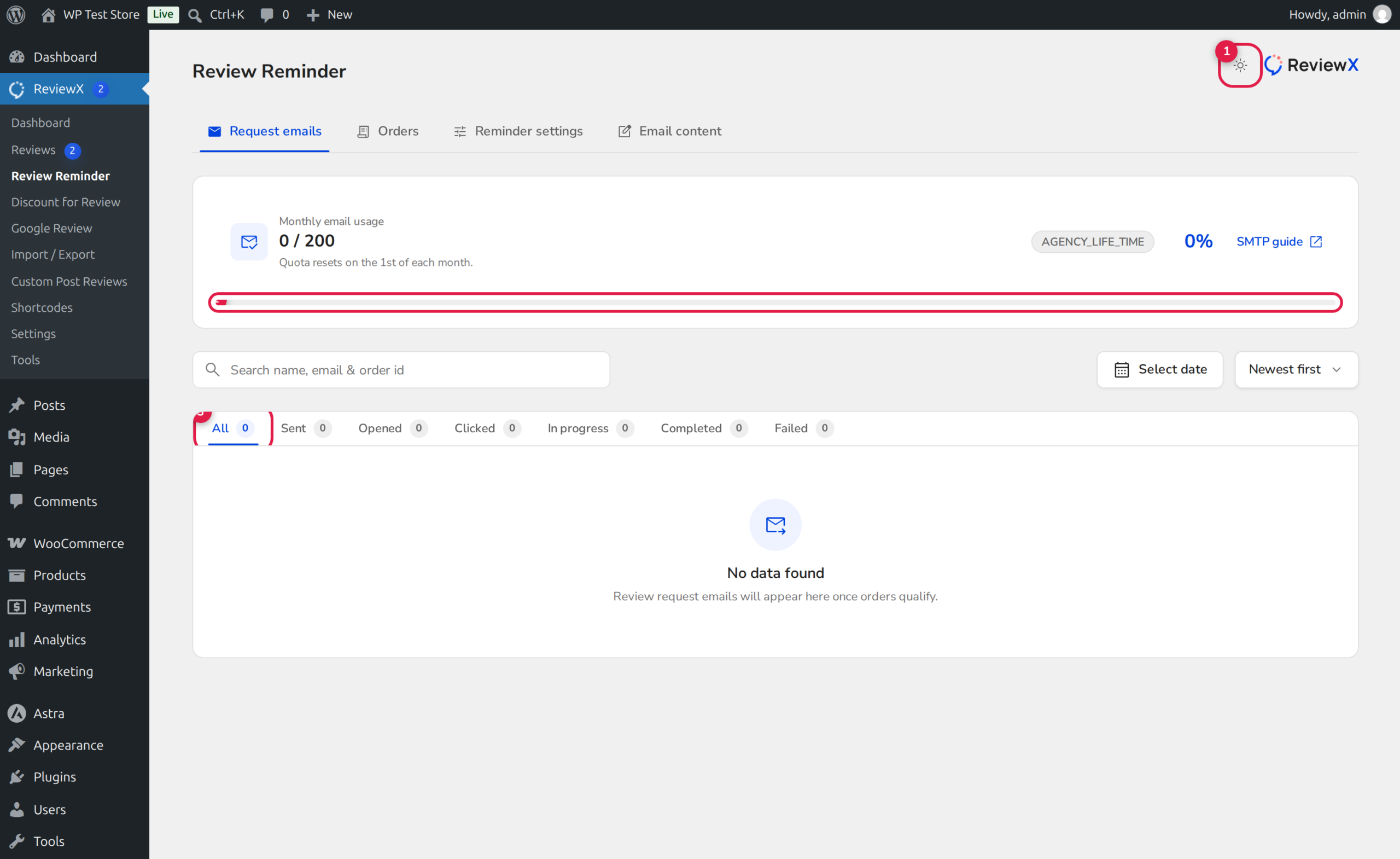
- Cause: Your store consumed 100% of its monthly reminder quota (shown in Badge 1 of the diagnostics screen). Outbound cloud dispatches pause until the next billing cycle.
- Resolution: Check your current usage at the top of ReviewX → Review Reminder. If exhausted, upgrade your plan via the ReviewX Client Portal or adjust reminder frequency to conserve quota.
4. Custom SMTP Relay Authentication Errors
If you have connected a custom SMTP relay (e.g. SendGrid, Mailgun, Amazon SES, or Google Workspace) instead of default cloud delivery:
- Symptom: Emails show as
Failedin the delivery log table. - Cause: Expired SMTP credentials, incorrect port (587 vs 465), missing TLS encryption, or SPF/DKIM authentication rejections at the recipient server.
- Resolution: Navigate to ReviewX → Settings → SMTP. Verify your host credentials and click Send Test Email to validate end-to-end SMTP handshake before resuming dispatches.
5. Unsubscribe & Spam Suppression
To comply with global anti-spam regulations (CAN-SPAM, GDPR):
- Symptom: Specific repeat customers never receive review reminders despite multiple completed orders.
- Cause: The shopper previously clicked the one-click unsubscribe link in a prior reminder. The SaaS cloud automatically suppresses all subsequent marketing and reminder requests for that email address.
Step-by-Step Diagnostic & Recovery Workflow
Step 1: Check Quota Telemetry
Navigate to ReviewX → Review Reminder. Review the quota card (Badge 1). Verify your remaining email balance and reset date.
Step 2: Inspect Real-Time Delivery Logs
Review the comprehensive Request emails table (Badge 2). Click through the status pills (Badge 3):
- In Progress: Message is queued in the SaaS cloud waiting for its scheduled delivery date.
- Sent: Transmitted successfully to recipient mail server.
- Opened / Clicked: Real-time recipient engagement telemetry recorded by the cloud tracking pixel.
- Failed: Transmission rejected or bounced by recipient server.
Step 3: Trigger Manual Resend or Retry
For any order record that failed or needs immediate dispatch without waiting for the scheduled delay:
- Locate the target order row in the Request emails table.
- Click the Retry action button for failed deliveries to re-queue the email through the cloud delivery pipeline.
- Click Send Now to bypass remaining delay days and deliver the reminder immediately.
Quick Diagnostic Matrix
| Issue | Root Architecture Cause | Fix in ReviewX |
|---|---|---|
| Zero orders appear in Reminder table | WordPress → SaaS event sync paused | Run ReviewX → Tools → Data sync → Sync now. |
| Orders completed but status stays empty | Wrong qualifying order status configured | Adjust trigger status in Review Reminder → Settings. |
| All dispatches suddenly stop | Monthly SaaS plan email quota reached | Upgrade subscription in Client Portal or wait for billing cycle reset. |
| Delivery status marked “Failed” | SMTP relay error or invalid customer address | Test SMTP in Settings → SMTP; click Retry on failed row. |


