


Shoppers place immense value on authentic buyer testimonials over generic online comments. Displaying an eye-catching Verified Owner badge directly alongside customer reviews provides immediate visual proof that the feedback comes from a real paying customer who actually purchased and used your product.
Thank you for reading this post, don't forget to subscribe!ReviewX features built-in verification intelligence that automatically checks customer purchase records in WooCommerce, validates order completion, and appends a verified buyer badge to legitimate customer reviews without requiring manual verification from store administrators.
The Verified Buyer Trust Multiplier
According to e-commerce consumer research, products displaying reviews with verified purchaser badges experience up to a 15% higher conversion rate compared to unverified reviews. Prospective customers perceive verified reviews as honest, unbiased, and immune to manipulation.
How ReviewX Verifies Customer Purchases
ReviewX validates buyer authenticity using a multi-step verification pipeline:
- Order Record Matching: When a review is submitted, ReviewX queries native WooCommerce orders using
wc_customer_bought_product( $customer_email, $user_id, $product_id ). - Order Status Validation: The plugin verifies that the corresponding order matches your configured eligibility status (e.g.,
CompletedorProcessing), preventing unfulfilled or cancelled orders from receiving badges. - Database Metadata Flagging: Verified reviews are stamped in
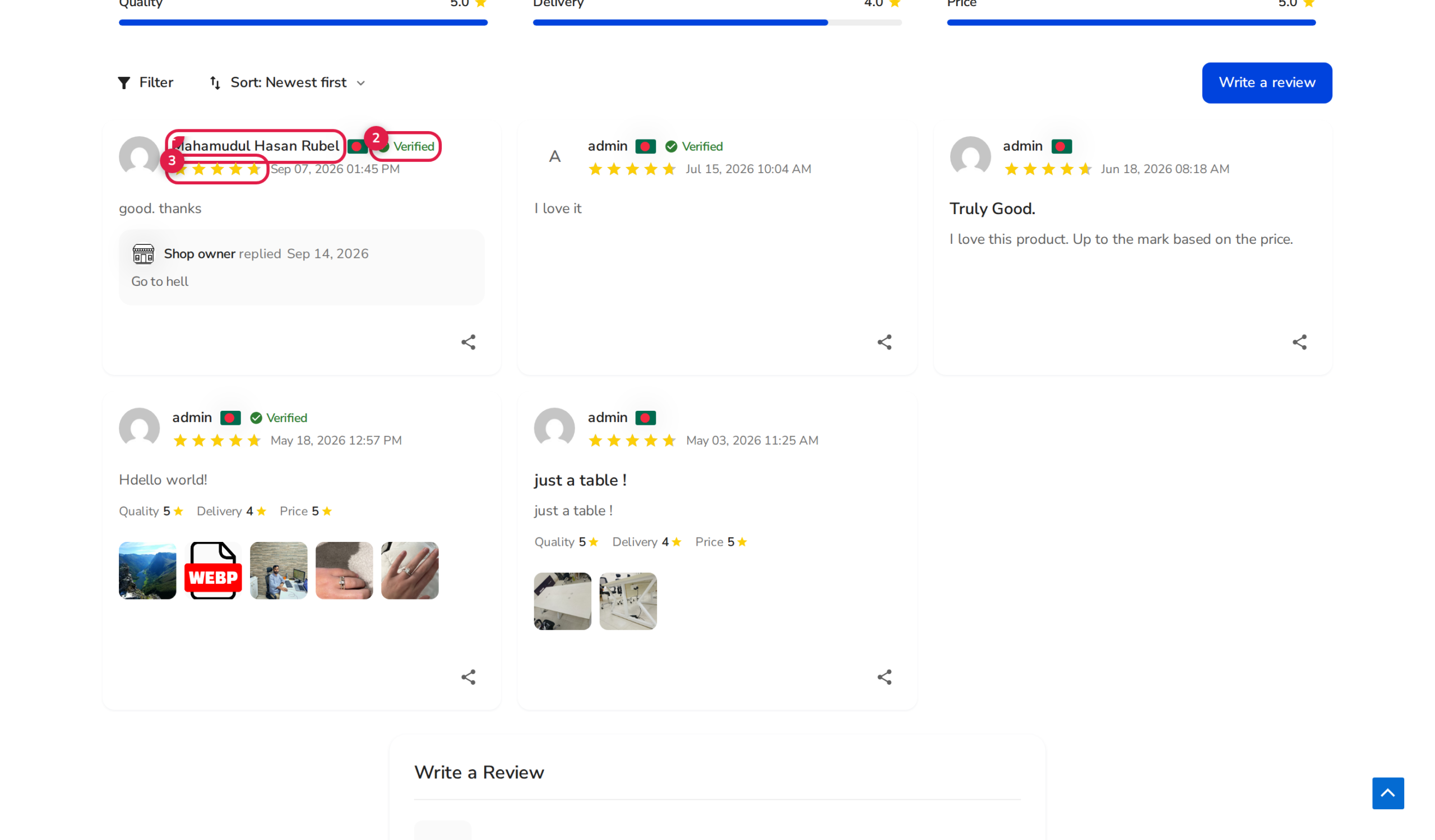
wp_commentmetawith_rx_verified_buyer = 1and linked to the unique order item record. - Storefront Rendering: The ReviewX Alpine/Tailwind storefront widget dynamically renders a distinctive badge (typically a green checkmark icon with custom text) next to the reviewer’s name.
Step-by-Step Guide: Enabling Verified Owner Badges
Step 1: Open Review Settings
From your WordPress dashboard, navigate to ReviewX → Reviews and click on the Review settings tab at the top of the interface.
Step 2: Review Who Can Send Reviews
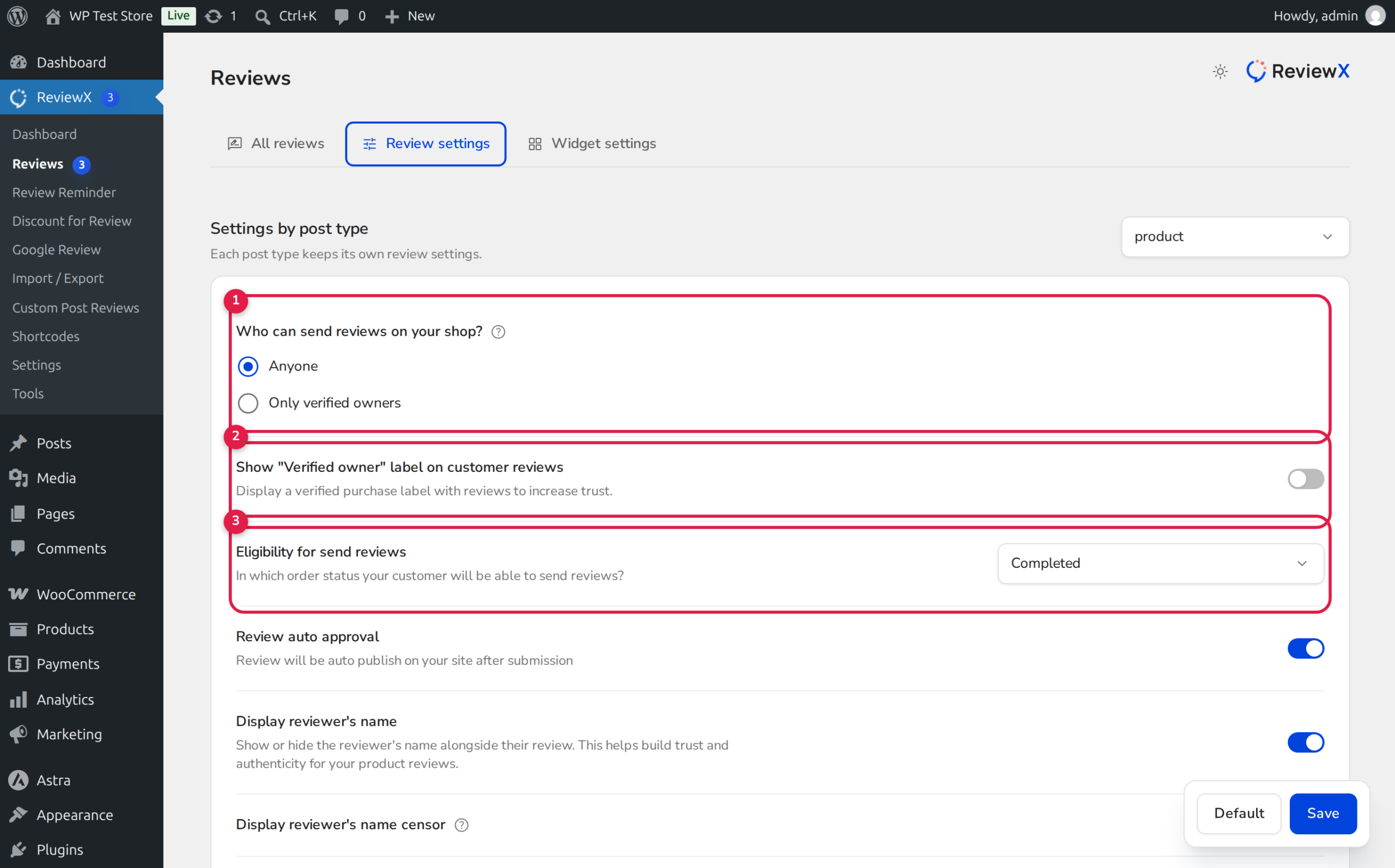
In the first section, Who can send reviews on your shop? (marked with Badge 1 in the settings screenshot):
- Select Only verified owners if you want to strictly restrict reviews to buyers.
- Alternatively, keep Anyone selected if you allow guest reviews but still want verified purchasers to stand out with badges.
Step 3: Enable the Verified Owner Badge
Locate the setting titled Show “Verified owner” label on customer reviews (Badge 2) and switch the toggle to active. This instructs the storefront widget to display the badge for all authenticated purchasers.
Step 4: Set the Order Eligibility Status
Under Eligibility for send reviews (Badge 3), select the order status that qualifies a purchase for verification (e.g., Completed). Orders with pending payment or on-hold status will not receive verified badges until marked complete.
Step 5: Save Settings
Click the Save button at the bottom of the form to apply the changes across your entire product catalog.
Customizing Badge Appearance in the Live Customizer
You can fine-tune the color, typography, and styling of your verified badges to match your store branding:
- Navigate to Appearance → Customize → ReviewX.
- Select Review List → Verified Badge.
- Customize the badge background color, border radius, checkmark icon, and label text (e.g., “Verified Buyer”, “Verified Purchaser”, or “Verified Customer”).
- Click Publish to deploy your custom styling live.
Frequently Asked Questions
What happens to guest buyers who checkout without an account?
ReviewX automatically verifies guest buyers by checking the billing email address entered during checkout. If the guest leaves a review using that same email address, ReviewX confirms the order and displays the verified badge.
Can I manually award a verified badge to a review?
Yes. When editing a review under ReviewX → Reviews, store administrators can toggle the Verified Owner switch inside the edit drawer to manually verify offline or imported reviews.
Do verified badges appear on Custom Post Types?
Yes. If you have integrated ReviewX with custom post types like Easy Digital Downloads or LifterLMS, users who purchased digital downloads or enrolled in courses will receive verified badges according to their order records.


