


When an initial review invitation goes unanswered, introducing a coupon incentive during the follow-up sequence provides a powerful psychological nudge. Hesitant or time-constrained buyers who bypassed the first email are often motivated to submit thoughtful feedback when offered a tangible financial reward on their next purchase.
Thank you for reading this post, don't forget to subscribe!ReviewX features an independent Follow-Up Review Discount pipeline that lets you automate coupon distribution specifically for second-stage review invitations without giving away unnecessary discounts during the first request.
Decoupled Incentive Strategy
ReviewX intentionally decouples reminder email delivery from discount email delivery. The reminder invitation teases the incentive to encourage participation, but the actual coupon code is dispatched by DiscountForFollowUpReviewRequestEmailJob only after the review is successfully submitted and verified.
How the Follow-Up Discount Scheduler Works
The follow-up discount system operates under strict programmatic rules to protect store margins while maximizing review collection:
- Eligibility Evaluation: The SaaS background cron runs daily at 13:00 store time. For each store order, it checks if the first review request was sent and whether the follow-up timing window has elapsed:
sent_rvw_req_email_at + discount.follow_up.timing <= now()
- Submission Verification: When the customer clicks the follow-up CTA and submits their rating and comments, ReviewX writes the review to WooCommerce (
wp_comments) and firesReviewSubmittedEvent. - Automated Coupon Generation: ReviewX calls WooCommerce REST API
POST /discount/wp/createto create a fresh, single-use coupon code with your configured discount type, value, expiry date, and usage limitations. - Reward Delivery: The customer immediately receives the dedicated discount email containing their code and one-click cart apply button.
Step-by-Step Guide: Configuring Follow-Up Review Discounts
Step 1: Open Discount Settings
From your WordPress dashboard, navigate to ReviewX → Discount for Review and click on the Discount settings tab.
Step 2: Enable the Follow-Up Discount Condition
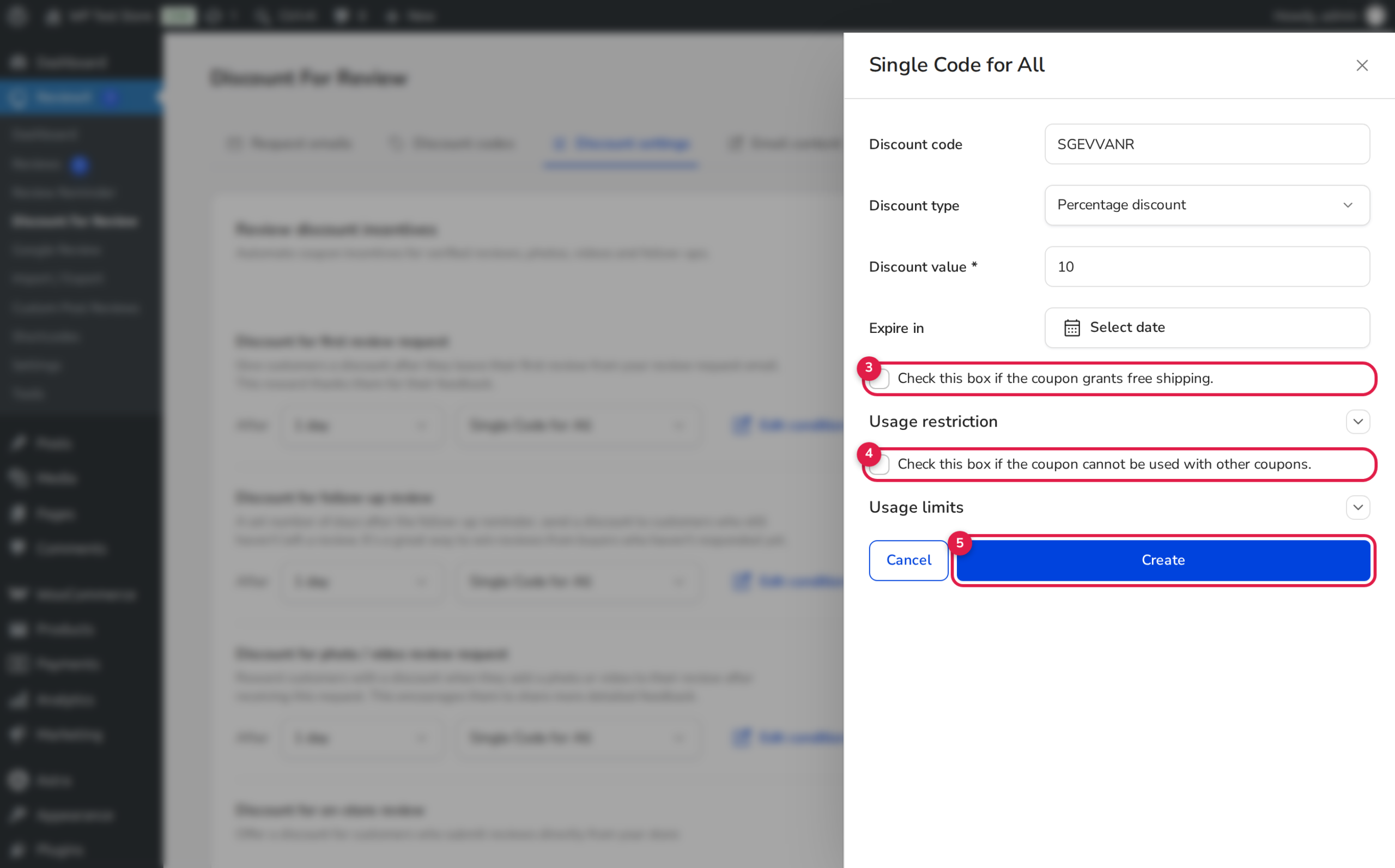
Locate the Discount for follow-up review section. Switch the toggle to active, then click Edit condition to open the configuration modal (annotated above).
Step 3: Configure Reward Parameters
Customize the reward rules according to your promotional strategy:
- 1. Code Generation Strategy: Choose Single Code for All (for fixed codes like
FEEDBACK15) or Generate Unique Code (for dynamically generated unique coupon codes). - 2. Discount Value & Type: Choose between percentage discounts (e.g.,
15%) or fixed currency reductions (e.g.,$10.00). - 3. Expiration Window: Select an expiration period (e.g.,
7 daysor14 days). Short expiration windows prompt immediate repeat orders. Check Free shipping if desired. - 4. Usage Restrictions: Enable Check this box if the coupon cannot be used with other coupons to prevent coupon stacking with other promotions.
- 5. Save Condition: Click Save or Create to activate the rule.
Measuring Follow-Up Discount ROI
You can monitor the performance of your review reminder and discount funnels under ReviewX → Discount for Review → Request emails:
| Metric | Status Code | What It Tells You |
|---|---|---|
| Sent | SENT (2) | Total follow-up invitations successfully dispatched. |
| Opened | OPENED (3) | Number of recipients who loaded the tracking pixel in their inbox. |
| Clicked | CLICKED (4) | Number of customers who clicked the CTA to open the review portal. |
| Completed | COMPLETED (5) | Verified reviews submitted and rewards successfully issued. |
Frequently Asked Questions
Can a customer receive both a first-request discount and a follow-up discount?
No. Once a customer submits a review for an order item, the status is marked COMPLETED and all subsequent discount or reminder jobs for that item are permanently terminated.
What happens if a customer unsubscribes from the follow-up reminder?
If the recipient clicks the unsubscribe link, ReviewX updates their email state to UNSUBSCRIBED (7). The customer will not receive any further reminder or discount communications for past or future orders until manually re-enabled.
Where are the generated coupons stored in WordPress?
All coupons created by ReviewX are native WooCommerce coupons stored in the wp_posts table (under post_type = 'shop_coupon'). You can manage, edit, or delete them anytime in WooCommerce → Coupons or directly in ReviewX → Discount for Review → Discount codes.


