


Search engines like Google and Bing rely on structured data markup to understand the content of eCommerce stores. When properly configured, structured data allows search engines to display Rich Snippets in search results — including bright yellow star ratings, total review counts, product pricing, and stock availability directly beneath your listing. These rich snippets dramatically increase click-through rates (CTR) and build instant shopper trust before visitors even land on your site.
Thank you for reading this post, don't forget to subscribe!ReviewX features native, automated JSON-LD schema generation that complies strictly with Schema.org standards. This guide explains how ReviewX schema architecture functions under the hood, how it enriches WooCommerce product structured data, and how to configure or disable it when integrating with third-party SEO plugins.
1. ReviewX Schema Architecture & Data Hierarchy
Unlike basic review plugins that output detached or incomplete schema snippets, ReviewX integrates directly with WooCommerce’s native structured data pipeline via the woocommerce_structured_data_product filter (handled internally by WoocommerceRichSchemaHandler.php). This ensures that review data is cleanly nested inside your store’s primary Product schema rather than floating as disconnected fragments.
When ReviewX is active on a single product page, it automatically computes and injects two critical Schema.org entities:
@type: AggregateRating— Calculates the exact mathematical average rating (e.g.,4.85) across all approved, published customer reviews, alongside the total review count.@type: Review— Generates individual review items containing the reviewer’s author information (@type: Person), individual rating value (@type: Rating), ISO 8601 publication date (datePublished), and verified review body text (reviewBody).
2. When Should You Disable ReviewX Product Schema?
By default, ReviewX schema generation is active out of the box with zero manual configuration required. However, there are specific scenarios where managing or toggling off schema output is necessary:
- Dedicated SEO Plugins Active: If your WordPress site utilizes an all-in-one SEO suite such as Rank Math SEO Pro, Yoast WooCommerce SEO, Schema Pro, or All in One SEO (AIOSEO), both plugins may attempt to output schema simultaneously.
- Preventing Search Console Warnings: Competing schema generators can trigger Google Search Console errors such as
Duplicate field 'aggregateRating'orMultiple reviews markup detected. - Custom Head Injection: Stores that inject customized JSON-LD schema through tag managers or headless frontend frameworks may prefer complete manual control.
3. How to Configure & Disable Default Product Schema
ReviewX provides a dedicated toggle in the WordPress admin to cleanly manage schema output without touching a single line of PHP code:
- From your WordPress dashboard, navigate to ReviewX → Reviews.
- Click on the Review settings tab in the upper navigation bar.
- Scroll down to the Disable default product schema row.
- Toggle the switch to your desired configuration:
- Switched ON: Strips native WooCommerce aggregate rating and review markup, allowing ReviewX or your chosen SEO plugin to serve as the single authoritative schema source.
- Switched OFF: Keeps standard multi-entity schema processing active.
- Click Save at the bottom of the page to apply your changes.
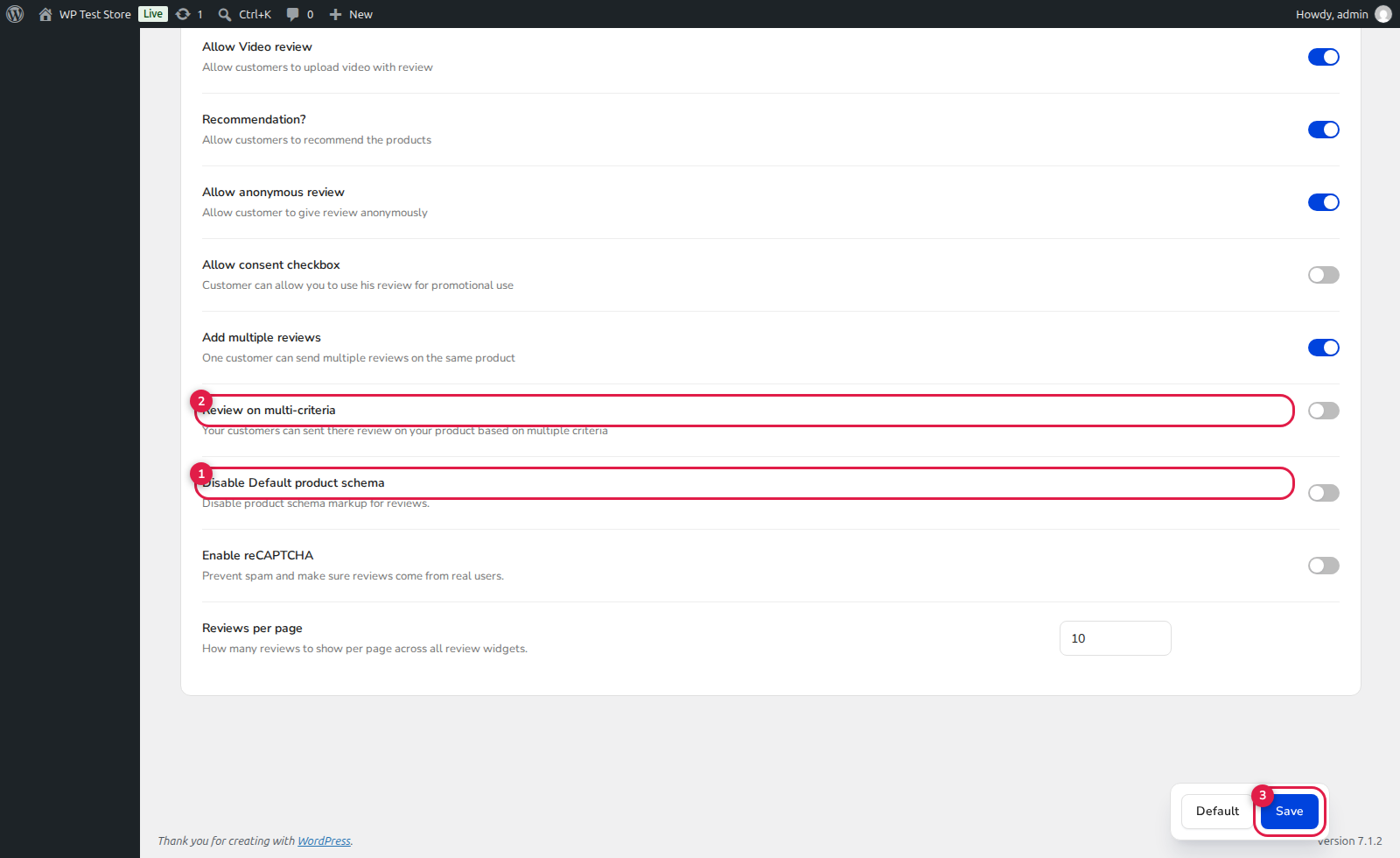
(1) Disable Default Product Schema: The primary control to eliminate conflicting structured data blocks.
(2) Multi-Criteria Reviews: Companion setting where criteria-specific ratings (e.g. Quality, Price, Value) feed into the overall aggregate rating score.
(3) Save: Immediately updates store settings and purges cached schema payloads.
4. Testing & Validating Your Schema Markup
After adjusting your ReviewX schema settings, always test your single product URLs using official structured data validation tools to guarantee compliance:
- Open Google’s official Rich Results Test tool.
- Enter the URL of any product that has published customer reviews.
- Click Test URL and inspect the detected structured data items.
- Verify that the Product entity displays green checkmarks for both
AggregateRatingandReviewswith zero critical errors. - Cross-reference using the Schema.org Validator to ensure proper JSON-LD syntax formatting.
5. Developer Hooks for Custom Schema Output
For advanced customizations, developers can hook into WooCommerce’s structured data filter or customize ReviewX metadata programmatically:
/**
 * Example: Customizing WooCommerce Product Schema with ReviewX data
 */
add_filter( 'woocommerce_structured_data_product', function( $markup, $product ) {
    // Check if product has reviews
    if ( isset( $markup['aggregateRating'] ) ) {
        // Add custom priceValidUntil or brand attributes if needed
        $markup['offers']['priceValidUntil'] = gmdate( 'Y-12-31' );
    }
    return $markup;
}, 20, 2 );
Frequently Asked Questions
How long does it take for star ratings to appear in Google search results?
Once your structured data is error-free, Google typically updates search snippets within 3 to 14 days following recrawling and re-indexing of your product pages.
Does ReviewX support schema for Custom Post Types?
Yes. When reviews are enabled on Custom Post Types (such as Portfolio, Courses, or Real Estate listings), ReviewX applies relevant Schema.org markup tailored to the respective post type.


