


One of the biggest concerns for established WooCommerce store owners upgrading to ReviewX is historical data safety: “Will installing ReviewX overwrite, hide, or erase the reviews my store has collected over the years?”
Thank you for reading this post, don't forget to subscribe!The definitive answer is no — 100% of your existing reviews, star ratings, and buyer comments are completely safe and instantly accessible. ReviewX is built directly on top of WordPress and WooCommerce core standards, ensuring zero data loss and an immediate visual upgrade for your store.
1. How ReviewX Seamlessly Integrates with Native WooCommerce Reviews
WooCommerce stores product reviews in the native WordPress database structure:
- Review Comments: Stored in
wp_commentswherecomment_type = 'review'. - Star Ratings: Stored in
wp_commentmetaunder the standard meta keyrating(values from 1 to 5). - Verified Purchaser Flags: Stored in
wp_commentmetaasverified.
ReviewX does not replace or isolate these database tables. Instead, ReviewX queries your existing WordPress comments directly. The moment you activate ReviewX, every past review is automatically displayed inside ReviewX’s modern, responsive storefront widgets, filterable grids, and admin moderation dashboard — with zero migration scripts or manual imports required.
2. How Pre-Existing Reviews Function Without Multi-Criteria
Because historical reviews were submitted before ReviewX multi-criteria were active on your site, they carry a single overall rating (e.g. 5 out of 5 stars):
- Full 5-Star Rating Display: Legacy reviews render with their complete overall star rating, customer name, date, and review text.
- Accurate Aggregate Score: Historical ratings are fully calculated into your product’s overall rating average and Google Rich Snippet schema.
- Graceful Degradation: Pre-existing reviews simply omit the criteria breakdown graph without creating visual gaps or broken layouts.
- Future Continuity: Any new review submitted after activating ReviewX will capture both the overall rating and your configured multi-criteria breakdown.
3. Viewing and Managing Historical Reviews in ReviewX
Immediately after activating ReviewX, you can verify and moderate all historical reviews from the central ReviewX dashboard:
- Navigate to ReviewX → Reviews in your WordPress admin menu.
- Click on the All reviews tab.
- All past customer reviews are listed with their author details, associated WooCommerce products, star ratings, and moderation status.
- You can edit review content, add administrative replies, or feature top testimonials immediately.
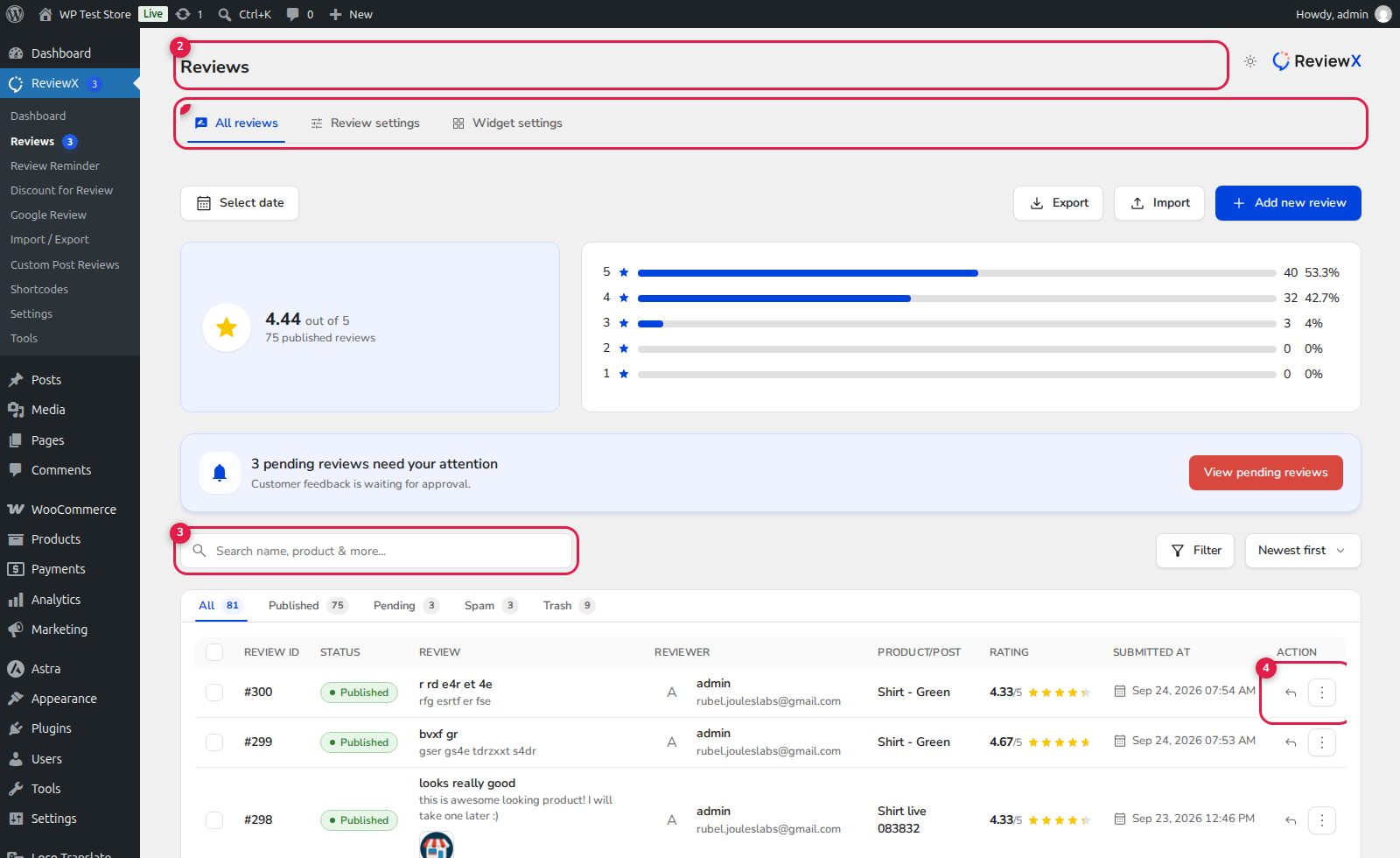
(1) All Reviews & Status Filters: View total published, pending, spam, and trashed reviews.
(2) Reviewer Author & Verification: Preserves verified buyer credentials from historical WooCommerce orders.
(3) Rating Summary: Displays legacy 5-star ratings alongside modern multi-criteria scores.
(4) Action Controls: Full ability to edit, reply, or manage reviews.


