


Deciding who is eligible to review your products is one of the most critical configuration choices in ReviewX. You can balance collecting higher review volume against enforcing strict authenticity.
Thank you for reading this post, don't forget to subscribe!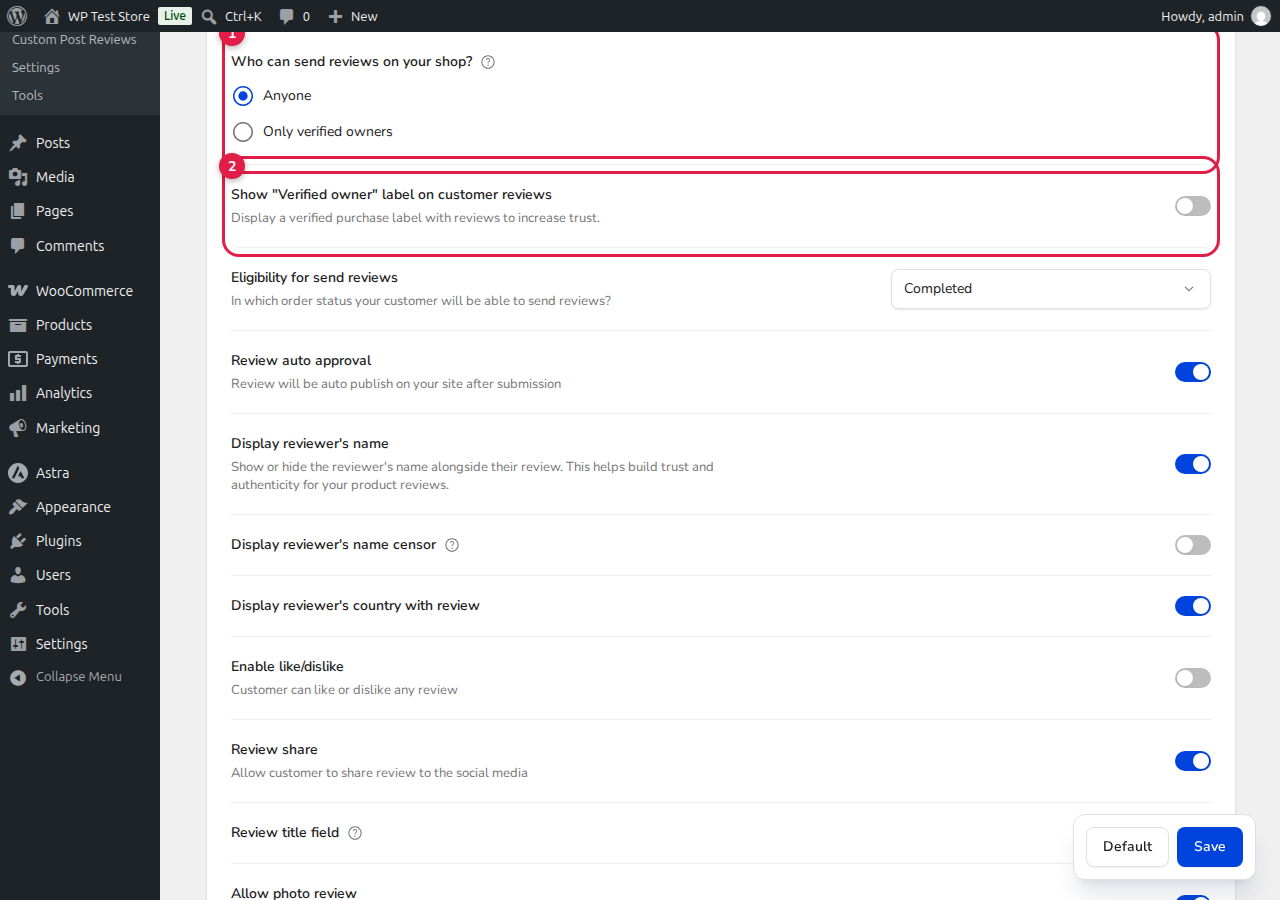
How to Configure the Policy
- Navigate to ReviewX → Reviews in your WordPress admin menu.
- Click on the Review settings tab.
- Locate the top policy settings highlighted in the tutorial image above.
Option Breakdown
- [1] Who can send reviews on your shop:
- Anyone: Any site visitor can submit a review, even without an account or purchase history. This setting is valuable for brand-new stores seeking to build initial social proof rapidly.
- Only verified owners: Only customers who have completed an authentic WooCommerce order containing that specific product are allowed to submit a review. This completely prevents competitor spam and fake reviews.
- [2] Show “Verified owner” label on customer reviews: Enable this switch to display a distinct “Verified Purchase” badge on reviews submitted by verified buyers on your product pages.
- [3] Eligibility for send reviews: Use this dropdown to specify which WooCommerce order status makes a customer eligible (typically set to Completed so customers cannot submit a review before receiving their items).
Once you make your selection, click Save at the bottom right to apply the changes across all product pages.


