


Preventing fraudulent testimonials, competitor defamation, and automated bot spam is critical for maintaining an honest, high-converting e-commerce store. Restricting review submissions exclusively to verified buyers who have completed an actual transaction is the single most powerful safeguard you can implement.
Thank you for reading this post, don't forget to subscribe!ReviewX includes a comprehensive submission gating system under ReviewX → Reviews → Review settings that automatically cross-checks customer purchase records, locks review forms for non-buyers, and protects your database from unauthorized submissions.
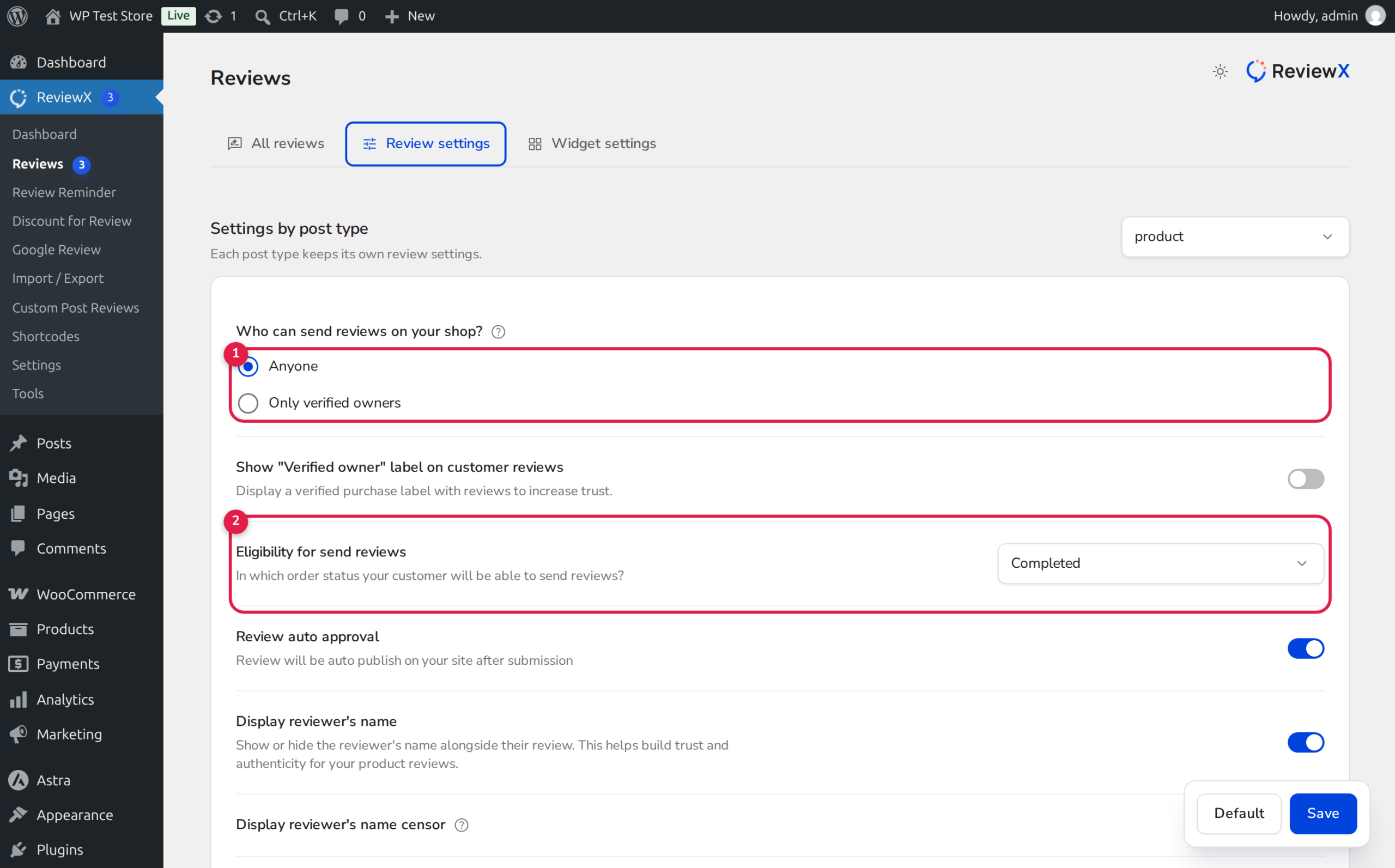
Two-Layer Verification Defense
ReviewX enforces verified purchase gating at two independent architectural layers:
1. Storefront UI Layer: Non-purchasers do not see the review submission form; instead, they see an informative notice explaining that only verified owners can submit reviews.
2. REST API Backend Guard: Even if a malicious bot attempts to submit a direct HTTP POST request, ReviewX’s StorefrontSubmissionGuard inspects order records and rejects unauthorized submissions with a 403 Forbidden status.
How the Verification Guard Operates
When a visitor accesses a product page or attempts to review an item, ReviewX evaluates eligibility through the following criteria:
- Identity Check: If the user is logged into WordPress, ReviewX retrieves their
user_id. If the user is a guest, ReviewX matches their email address against past completed orders. - Order Query: ReviewX calls
wc_customer_bought_product()to verify whether the customer purchased the specific product. - Order Status Verification: The order status must match your configured eligibility setting (e.g.,
Completed). If an order isPending payment,Cancelled, orRefunded, the customer cannot submit a review. - Per-Order Quota Guard: If you have configured single-review limits, ReviewX verifies whether the customer already submitted feedback for that order item.
Step-by-Step Guide: Restricting Reviews to Verified Owners
Step 1: Open Review Settings
Navigate to ReviewX → Reviews in your WordPress admin menu and click on the Review settings tab.
Step 2: Select “Only Verified Owners”
Under the first configuration section, Who can send reviews on your shop? (marked with Badge 1 in the illustration above):
- Select the radio option labeled Only verified owners.
- This immediately activates strict purchase gating across your storefront.
Step 3: Define Qualifying Order Status
Under Eligibility for send reviews (Badge 2):
- Select the order status required before a customer can review.
- We recommend selecting Completed so customers only review products they have received and had time to use.
Step 4: Enable Verified Owner Badges
Ensure that Show “Verified owner” label on customer reviews is toggled ON so approved customer feedback proudly displays the verified checkmark.
Step 5: Save Settings
Click Save at the bottom of the page to deploy the verification policy live.
Non-Buyer Storefront Experience
When a visitor who has not purchased the item scrolls to your review section, the review input form is hidden and replaced with a polite notice:
🔒 Only verified customers who have purchased this product can leave a review.
This transparent message reassures prospective buyers that the existing reviews on your product page are 100% authentic and verified.
Frequently Asked Questions
How do customers who bought as guests leave verified reviews?
Guest buyers can submit verified reviews in two ways:
1. Review Reminder Emails: When you send automated review reminders via ReviewX, the outbound link contains a signed JWT token that automatically verifies their purchase without requiring a login.
2. Storefront Guest Review: The guest enters the exact email address used at checkout, allowing ReviewX to verify their purchase against historical orders.
Can customers review products from orders that were refunded?
No. If an order has a refunded_at timestamp or status of Refunded in WooCommerce, ReviewX automatically blocks review submissions and excludes the order from reminder campaigns.
Can I manually add reviews for verified offline customers?
Yes. In ReviewX → Reviews, click Add Review in the top header. You can manually enter the review details, link the customer, and toggle the Verified Owner switch to approved.


