


While automated email campaigns are essential for re-engaging past purchasers, many enthusiastic customers return to your website on their own initiative and write reviews directly on your single product pages. Rewarding these organic, on-site submissions ensures you capture maximum social proof and delight returning shoppers immediately.
Thank you for reading this post, don't forget to subscribe!ReviewX features a specialized On-Store Review Discount engine that detects when a verified buyer submits a review through your on-site storefront widget, automatically provisions a WooCommerce coupon, and emails the reward directly to the customer’s inbox.
Smart Campaign Suppression
When a customer submits an on-store review, ReviewX fires LinkReviewToOrderItemJob in the background. This marks the order item as COMPLETED and immediately cancels any pending reminder emails or reminder discounts, eliminating redundant emails and annoying spam.
How the On-Store Discount Trigger Operates
The lifecycle of an on-store review discount involves tight coordination between the storefront widget and the coupon management system:
- Review Submission: A customer opens the product page review form (or tab) powered by ReviewX, completes multi-criteria ratings, adds comments, and submits the form.
- Verification & Linking: ReviewX validates whether the customer is a verified buyer by matching their logged-in user account or guest checkout email address against past WooCommerce orders.
- Immediate Reward Trigger: The background worker
handleAutomatedReviewsJobexecutes. If the Discount for on-store review setting is active, ReviewX communicates with WooCommerce to generate or retrieve the designated coupon code. - Coupon Dispatch: ReviewX sends the designated Discount Email to the reviewer with their personalized coupon code and redemption link.
Step-by-Step Guide: Enabling On-Store Review Discounts
Step 1: Open Discount Settings
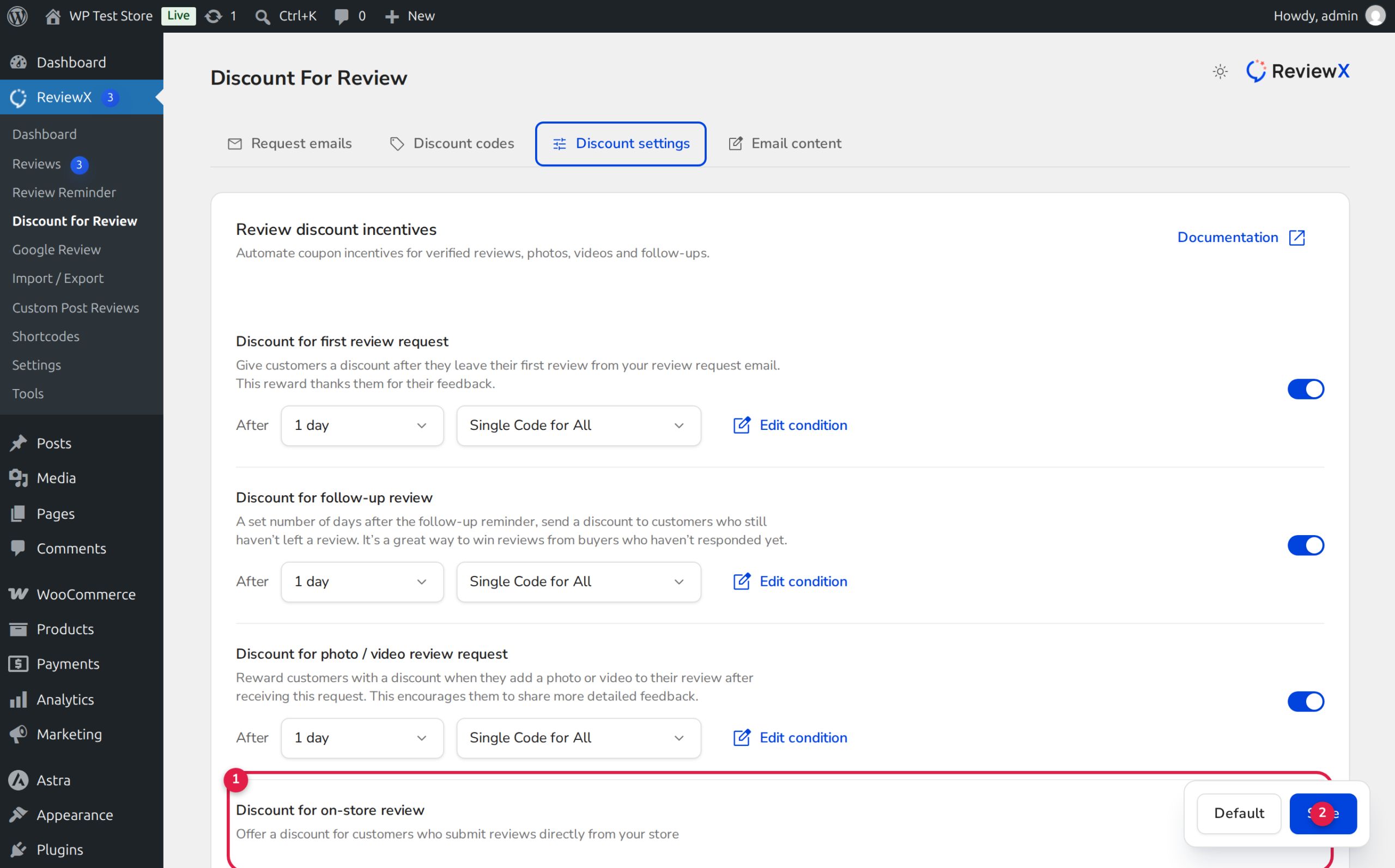
Navigate to ReviewX → Discount for Review in your WordPress admin menu. Click on the Discount settings tab.
Step 2: Locate the On-Store Review Section
Scroll down to the Discount for on-store review card (marked with Badge 1 in the illustration above):
- Review the descriptive prompt: “Offer a discount for customers who submit reviews directly from your store.”
- Click the toggle switch (Badge 2) to turn the feature from disabled to active.
Step 3: Define Coupon Details
Configure the coupon parameters that will be awarded to on-store reviewers:
- Single Code vs Unique Code: Select whether you want all on-store reviewers to receive a universal coupon code (e.g.,
THANKS10) or automatically generated unique single-use codes. - Discount Value: Enter the percentage or fixed currency amount to deduct from their next order.
- Expiry Date: Set an expiration window to instill purchase urgency.
Step 4: Save Changes
Click the Save button to activate on-store reward tracking across your entire product catalog.
Preventing Promotion Abuse
To protect your store from bad actors attempting to exploit on-store coupons, ReviewX includes built-in security controls:
| Protection Mechanism | How ReviewX Enforces It |
|---|---|
| Verified Owner Gating | Under ReviewX → Settings → Review Settings, enable “Only allow reviews from verified owners”. Non-purchasers cannot submit reviews and will never receive coupon rewards. |
| One Coupon Per Order | ReviewX tracks review submissions against the unique order_item_id. A customer cannot receive multiple coupons for reviewing the same purchased item repeatedly. |
| Individual Use Only | Marking the coupon as Individual use only ensures buyers cannot combine review discount codes with clearance coupons or holiday flash sales. |
Frequently Asked Questions
Do guests qualify for on-store review discounts?
Yes, provided guest checkout is enabled in WooCommerce and the guest enters the identical billing email address used during their purchase. ReviewX verifies past completed orders by email matching before generating the discount coupon.
Can I offer on-store review discounts for Custom Post Types?
Yes. If you have integrated ReviewX with custom post types such as Easy Digital Downloads or LifterLMS, reviews submitted on those post types also trigger the configured reward flow.
Where can I view all issued on-store discount codes?
Go to ReviewX → Discount for Review → Discount codes to view a searchable ledger of every coupon generated, including customer email, discount value, creation date, and status.


