


For online course creators and educational academies running LifterLMS, student testimonials and authentic ratings are the single most powerful driver of new course enrollments. Prospective students want to know if course materials are clear, instructors are supportive, and previous learners achieved real-world results.
Thank you for reading this post, don't forget to subscribe!ReviewX integrates seamlessly with LifterLMS. Because LifterLMS registers courses and lessons as standard WordPress custom post types (course and lesson), ReviewX’s custom post type engine allows you to collect multi-criteria student evaluations, certificate photos, and video testimonials on all your educational content.
1. How ReviewX Maps to the LifterLMS Architecture
In LifterLMS, educational assets are organized under two core post types:
- Courses (
course): Top-level course syllabus, overview pages, and enrollment landing pages. - Lessons (
lesson): Individual curriculum units and video tutorials inside a course track.
ReviewX automatically detects both the course and lesson post types under ReviewX → Custom Post Reviews. You can enable reviews on courses, lessons, or both — and assign unique multi-criteria rating scales specifically tailored to e-learning.
2. Step-by-Step Guide: Setting Up Reviews for LifterLMS
Follow these steps to activate and configure student reviews for your LifterLMS courses:
- Navigate to ReviewX → Custom Post Reviews in your WordPress admin menu.
- Click the Add post type button in the top-right corner.
- In the modal dropdown, search for and select Courses (
course). - Click the Settings (Gear) icon next to the Course row to configure your e-learning criteria:
- Criteria 1: Course Content & Depth
- Criteria 2: Instructor Clarity
- Criteria 3: Practical Assignments
- Criteria 4: Value for Money
- Enable Allow photo reviews and Allow video reviews so students can attach graduation certificates or recorded video success stories.
- Under review submission permissions, select Registered users only so that only authenticated, enrolled students can submit course reviews.
- Click Save to publish your configuration.
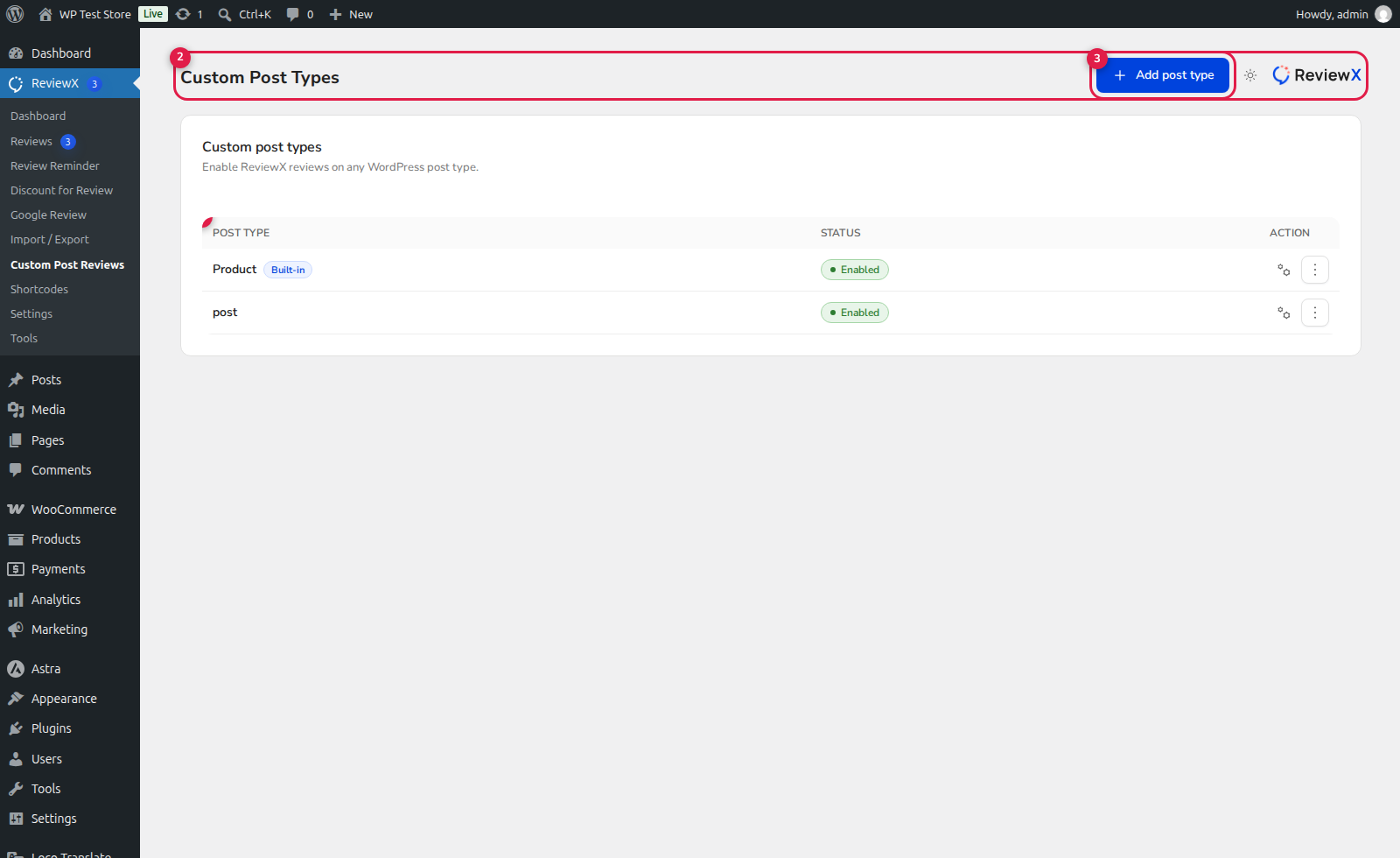
(1) Custom Post Type Table: Displays LifterLMS courses alongside other active content types.
(2) Criteria & Media Controls: Define student evaluation metrics and enable certificate/video uploads.
(3) Add Post Type: Quickly add
lesson or membership post types if desired.
3. Displaying Course Reviews on LifterLMS Landing Pages
You can render student feedback on your LifterLMS course templates using several streamlined methods:
- Dedicated Shortcode: Add the ReviewX review list directly beneath your course syllabus or enrollment CTA:
[rvx-review-list post_type="course" filter="on" per_page="6"] - Course Criteria Summary Graph: Display an aggregate visual breakdown of how students rated the course:
[rvx-criteria-graph post_type="course"] - Page Builder Widgets: Use Elementor, Divi, or Oxygen builder modules to position review cards, student avatars, and star ratings anywhere in your sales funnel.


