


Visual customer feedback—including high-resolution photos and hands-on unboxing videos—dramatically improves conversion rates by giving prospective buyers tangible proof of product quality. Because capturing and uploading media requires extra effort from your customers, offering a higher reward tier for photo and video reviews provides the necessary incentive to generate authentic user-generated content (UGC).
Thank you for reading this post, don't forget to subscribe!ReviewX includes a dedicated discount automation engine designed specifically to reward visual feedback. You can configure automatic coupon delivery for customers who attach photos or videos to their reviews, set precise eligibility rules, and integrate seamless one-click redemption in your WooCommerce checkout.
Pro Tip: Tiered Incentive Architecture
Store owners often offer a standard 5% to 10% coupon for standard text reviews, but bump the incentive to 15% or 20% for submissions containing verified photos or video footage. This tiered structure dramatically increases photo and video submission rates while maintaining healthy profit margins.
How the Photo and Video Discount Automation Works
ReviewX runs a high-performance delegated background scheduler that automates discount calculation and coupon dispatch without slowing down your WordPress admin:
- Media Verification: When a customer submits a review with uploaded media, ReviewX registers the attachment metadata in
wp_commentmetaunder_rx_attachmentsand flags the order item as media-verified. - Dedicated Scheduler: The ReviewX SaaS engine runs
DiscountForPhotoReviewRequestEmailJobduring its daily dispatch sequence (at 13:00 store time), calculating eligibility againstsent_rvw_req_email_at + discount.photo_review.timing. - Coupon Generation: Depending on your settings, ReviewX either distributes a global promotional coupon or securely communicates with WooCommerce via
POST /discount/wp/createto create a unique, single-use coupon tied to the customer’s email. - Automated Delivery: A beautifully formatted reward email is dispatched to the customer containing their discount code, validity period, and a direct link to apply the savings directly into their WooCommerce cart.
Step-by-Step Guide: Configuring Photo & Video Review Discounts
Step 1: Open Discount Settings
From your WordPress dashboard, navigate to ReviewX → Discount for Review and click on the Discount settings tab at the top of the interface.
Step 2: Enable Photo & Video Review Incentives
Scroll down to the Discount for photo / video review request section and switch the toggle to active. This activates the background evaluation job for any orders where customer reviews feature media uploads.
Step 3: Configure Coupon Rules and Conditions
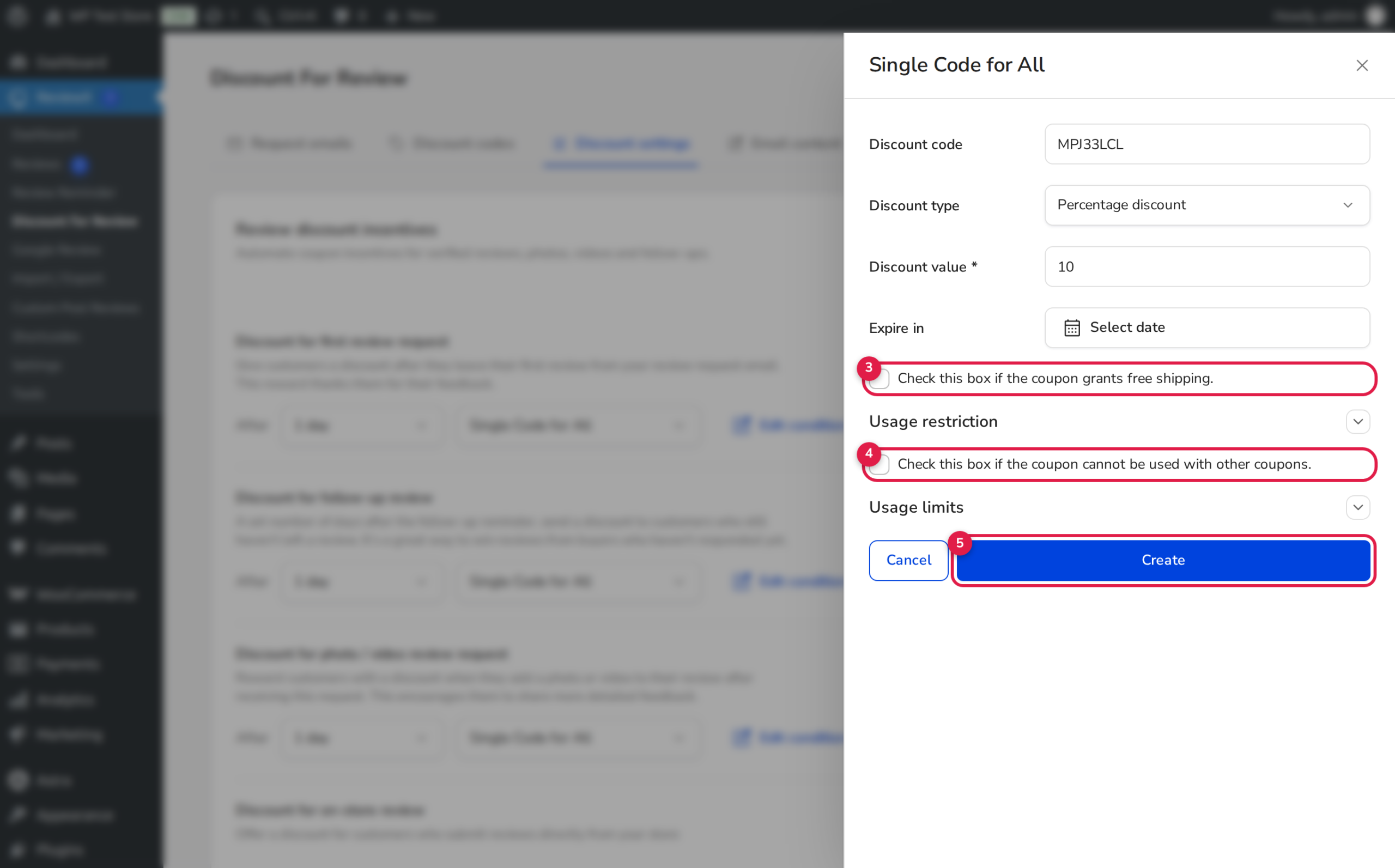
Click the Edit condition button on the photo/video card to open the coupon configuration modal (shown in the annotated screenshot above):
- 1. Coupon Strategy: Toggle between Single Code for All (uses a shared coupon code like
PHOTO20) or Generate Unique Code (creates a distinct alphanumeric coupon for every customer to prevent code sharing). - 2. Discount Type & Value: Select from
Percentage discount,Fixed cart discount, orFixed product discount, then enter the numeric reward value (e.g.,15for 15% off). - 3. Expiration Window: Set an expiration period (e.g., 14 days or 30 days) to encourage prompt repeat purchases. Optionally check Free shipping to bundle complimentary delivery with the coupon.
- 4. Usage Restrictions: Enable Individual use only to prevent customers from combining this reward with other ongoing sales or promotional codes.
- 5. Save Condition: Click Save or Create to finalize your reward configuration.
Customer Redemption Workflow
ReviewX makes redeeming visual review discounts effortless for your shoppers:
Seamless One-Click Cart Application
In addition to displaying the raw coupon code inside the reward email, ReviewX includes an automated redemption link targeting the client portal (/discount-apply.vue). When clicked, the endpoint calls WooCommerce REST API /discount/wp/apply:
WC()->cart->apply_coupon( $coupon_code );
The customer is immediately redirected to your store checkout with the discount already applied to their order total.
Frequently Asked Questions
What happens if a customer uploads a photo but deletes it later?
ReviewX records the media attachment in wp_commentmeta at the moment of review approval. Once the discount coupon is generated and issued, it remains valid according to your configured expiration rules, even if the photo is later moderated or removed.
Can I require video reviews specifically for a higher coupon?
Both photos and videos qualify under the visual review reward condition. You can emphasize video reviews in your email copy and remind customers that unboxing videos give them a chance to receive featured placement on your store’s homepage widgets.
Are coupons automatically deleted if I remove the condition in ReviewX?
No. Deleting or modifying a condition prevents new coupons from being scheduled. Existing coupons that have already been issued to customers will remain in WooCommerce until they expire or are manually revoked by the store administrator.


