


Visual reviews featuring customer photos and unboxing videos generate significantly higher buyer trust and conversion rates than plain text comments. The Photo & Video Review Request Email in ReviewX allows you to specifically invite past customers to upload visual proof of their purchase, transforming standard reviews into compelling visual social proof.
Thank you for reading this post, don't forget to subscribe!ReviewX gives you complete control over your photo and video review email invitations, from high-resolution header graphics and customizable subject lines to dynamic customer personalization and direct tokenized upload links.
Automated Delivery & Schedule Timing
The timing of this email is configured under Review Reminder → Reminder settings → Request for photo / video review. The SaaS scheduler dispatches PhotoReviewRequestReminderJob at 13:00 store time based on reviewed_at + photo_review.email.timing. If a customer already uploaded media during their initial submission, ReviewX automatically skips sending this reminder.
Anatomy of the Photo & Video Email Customizer
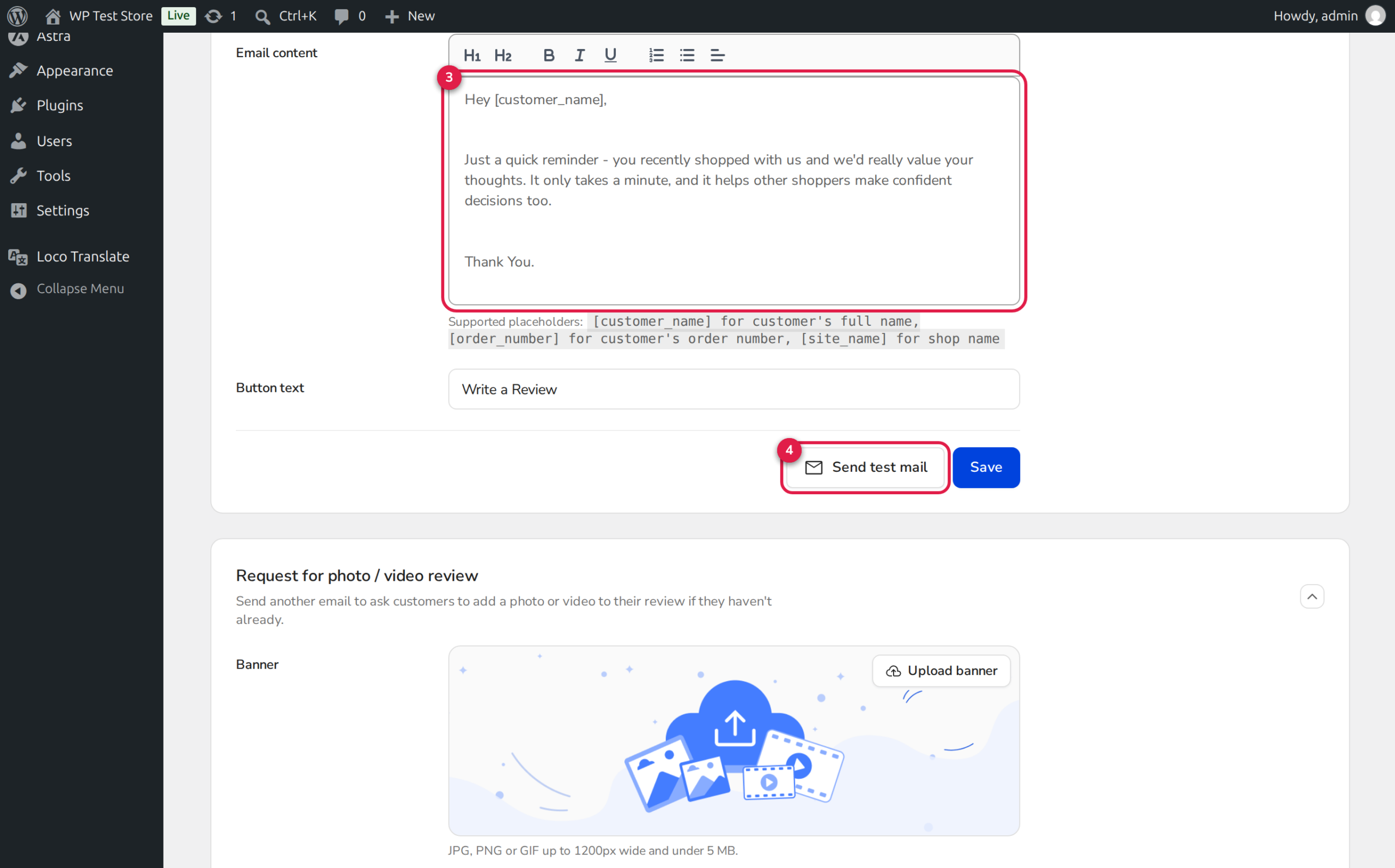
As highlighted in the annotated interface above, ReviewX provides a streamlined editor with dedicated controls for every section of your visual review invitation:
- 1. Sub-Tab Selector: Switch between First review request, Follow-up review request, Request for photo / video review, and Thank you email.
- 2. Promotional Banner Upload: Upload an eye-catching banner graphic (JPG, PNG, or GIF up to 1200px wide and under 5 MB) showcasing customer community photos or unboxing highlights.
- 3. Dynamic Subject Line: Personalize the email subject using pre-set placeholders to maximize open rates in crowded customer inboxes.
- 4. Rich Email Body Editor: Customize the invitation text with formatting, bullet points, and incentives explaining why visual reviews are celebrated.
- 5. Action Button & Test Mail: Set custom Call-to-Action button text (e.g., “Add Photos & Videos”) and send instant test previews to verify mobile formatting.
Supported Dynamic Placeholders
You can insert dynamic merge tags into both the Email Subject and the Email Content. ReviewX replaces these tags at dispatch time with authentic order metadata:
| Placeholder | Description | Example Output |
|---|---|---|
| [customer_name] | Customer’s full name from billing details | Sarah Jenkins |
| [order_number] | WooCommerce order identification number | #10492 |
| [site_name] | Your store name from WordPress general settings | Artisan Home Goods |
| [discount_amount] | Configured coupon reward value (if discount active) | 15% OFF |
Step-by-Step Guide: Customizing Your Visual Review Invitation
Step 1: Open the Review Reminder Workspace
In your WordPress dashboard, navigate to ReviewX → Review Reminder and click on the Email content tab.
Step 2: Select the Photo/Video Request Sub-Tab
Click on Request for photo / video review in the secondary tab navigation bar.
Step 3: Upload a Branded Header Graphic
Under the Banner section, click Upload banner to select a branded graphic from your WordPress media library or upload a new file. High-contrast images that highlight real customer product photos perform best.
Step 4: Craft a Compelling Subject Line
Enter an engaging subject line that invites customers to share their experience. For example:
Show us your new style, [customer_name]! Upload a photo for [discount_amount]
Step 5: Customize the Body Copy and Button Text
Use the visual editor to explain how easy it is to attach photos from a smartphone. In the Button text field, enter an action-oriented label such as Upload Photos Now.
Step 6: Send a Test Email and Save
Enter your email address in the test email field and click Send test mail. Inspect the email in desktop and mobile clients to ensure logos, text, and buttons render cleanly. Once satisfied, click Save.
Frictionless Tokenized Media Uploads
When the customer clicks the CTA button in their email, they are directed to the secure ReviewX Client Portal via a signed tracking token:
https://portal.reviewx.io/review?uid={token}&order_item={item_id}
The customer does not need to enter a WordPress username or password. The mobile-friendly upload form opens directly, allowing them to tap and select photos or video clips right from their camera roll.
Frequently Asked Questions
What video sources can customers upload through the portal?
ReviewX supports direct video file uploads (MP4, WEBM, MOV) as well as external links from YouTube, Vimeo, and Dailymotion. You can restrict video sources to internal files only or external links only in ReviewX → Settings → Review Settings.
Can I disable this email while keeping the first review request active?
Yes. Go to ReviewX → Review Reminder → Reminder settings and simply toggle off Request for photo / video review. Your initial review requests and thank-you emails will continue running normally.
Where are customer photos stored?
Customer photos are securely stored in your WordPress Media Library under wp-content/uploads/reviewx/ and linked to the corresponding comment record in wp_commentmeta.


