


Displaying social proof across prominent widget-ready areas of your store—such as sidebars, footers, and shop header banners—reinforces brand credibility and encourages shoppers to explore high-rated items. While modern page builders provide drag-and-drop elements, classic WordPress widgets remain the most efficient way to maintain persistent customer review displays across your entire website.
Thank you for reading this post, don't forget to subscribe!ReviewX includes a comprehensive suite of native Classic Widgets that can be embedded into any registered sidebar or footer widget area supported by your WordPress theme.
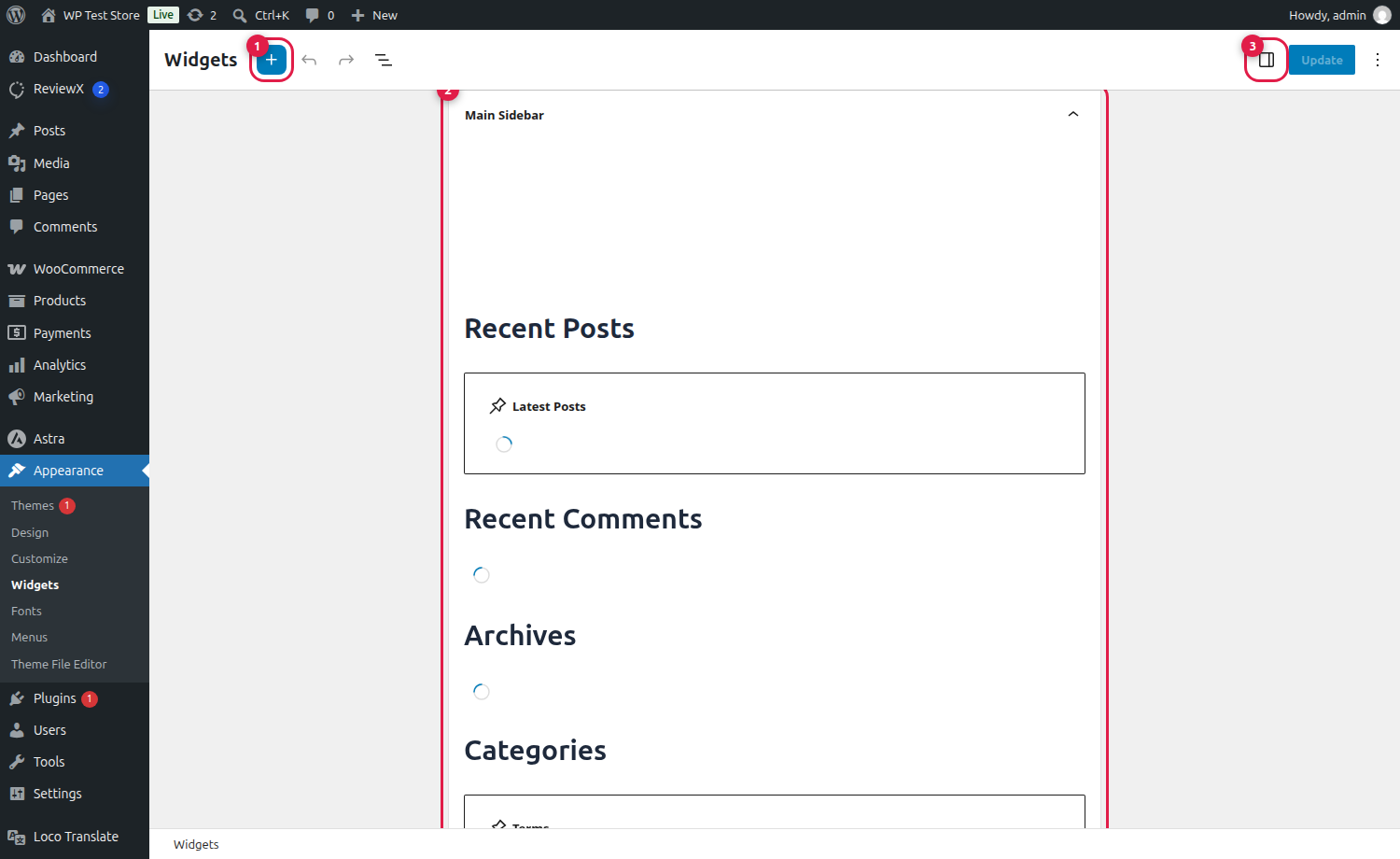
Sitewide Social Proof Placement
Placing a ReviewX Summary or Recent Reviews widget inside your shop sidebar or footer ensures that shoppers encounter authentic customer praise on blog posts, cart pages, and category archives, not just single product pages.
Overview of ReviewX Classic Widgets
ReviewX registers dedicated widget classes inside WordPress core (app/Widgets/Classic/):
| Widget Name | Primary Purpose | Recommended Placement |
|---|---|---|
| ReviewX Review List | Renders a stream of recent customer reviews with reviewer names, star ratings, and dates. | Blog sidebar, Shop archive sidebar |
| ReviewX Review Stats | Displays total review counts, aggregate store score, and customer recommendation percentages. | Footer columns, About Us sidebar |
| ReviewX Criteria Graph | Visual multi-criteria rating breakdown bars illustrating quality, pricing, and fit. | Product page sidebars |
| ReviewX Summary Badge | Compact trust badge featuring total average rating stars and customer count. | Header top bar, Site footer |
| ReviewX Google Reviews | Displays verified Google Business reviews alongside your WooCommerce feedback. | Homepage sidebar, Footer trust block |
Step-by-Step Guide: Adding ReviewX Widgets
Step 1: Open the WordPress Widgets Screen
From your WordPress administrative menu, navigate to Appearance → Widgets.
Step 2: Add the ReviewX Widget
Click the Add Block / Inserter toggle button (marked with Badge 1 in the screenshot above) and search for “ReviewX”:
- Select the ReviewX widget that matches your desired display (e.g., ReviewX Review List or ReviewX Review Stats).
- Add the widget into your target widget area (Badge 2), such as the Main Sidebar or Footer Column.
Step 3: Configure Widget Display Options
In the widget settings block, configure your preferences:
- Title: Set a custom heading (e.g., “What Our Customers Say”).
- Number of Reviews: Choose how many reviews to display (typically 3 to 5).
- Display Options: Toggle display of reviewer avatars, verified purchaser badges, and review dates.
Step 4: Save Changes
Click the Update button (Badge 3) in the top-right corner to publish your widgets live across your store.
Styling Widgets in the WordPress Live Customizer
You can fine-tune the typography, star colors, borders, and margins of ReviewX widgets using the WordPress Live Customizer under Appearance → Customize → ReviewX to ensure pixel-perfect brand alignment.
Frequently Asked Questions
Do ReviewX widgets work with the Classic Widgets plugin?
Yes. ReviewX fully supports both the modern block-based Widgets editor and the legacy Classic Widgets plugin (WP_Widget architecture).
Can I display reviews for a specific product in the sidebar?
Yes. ReviewX widgets accept a Product ID attribute allowing you to lock a sidebar widget to a specific hero product or display sitewide store reviews dynamically.
Are classic widgets mobile-friendly?
Yes. All ReviewX classic widgets are fully responsive and automatically stack cleanly on mobile viewports and tablets.


