


Personalized emails generate significantly higher open and engagement rates compared to generic broadcast messages. When sending post-purchase review requests, addressing customers by their actual name and referencing their exact order details establishes immediate authenticity and boosts review completion rates.
ReviewX features a built-in email templating engine with dynamic merge tags (placeholders) that automatically populate customer and order information at the moment of dispatch. This guide provides a complete reference for all supported merge tags and shows you how to customize your email templates.
Supported ReviewX Email Merge Tags Reference
You can use the following placeholders inside both the Email Subject and the Email Content Body across all ReviewX email sequences:
| Merge Tag | Description | Example Rendered Value |
|---|---|---|
[customer_name] |
The customer’s full name from billing or order details. | Sarah Jenkins |
[order_number] |
The unique WooCommerce order identifier / order ID. | #10492 |
[site_name] |
Your store name or WordPress site title. | Artisan Home Decor |
Where to Customize Email Templates
To customize your review request templates with merge tags:
- In your WordPress admin dashboard, navigate to ReviewX → Review Reminder.
- Click on the Email content tab at the top.
- Select any email in the automated sequence to expand its editor:
- First review request: The initial email sent after purchase.
- Follow-up review request: Sent to customers who haven’t left a review yet.
- Request for photo / video review: Encourages customers to attach photos or video clips.
- Thank you email: Sent immediately after a review is submitted.
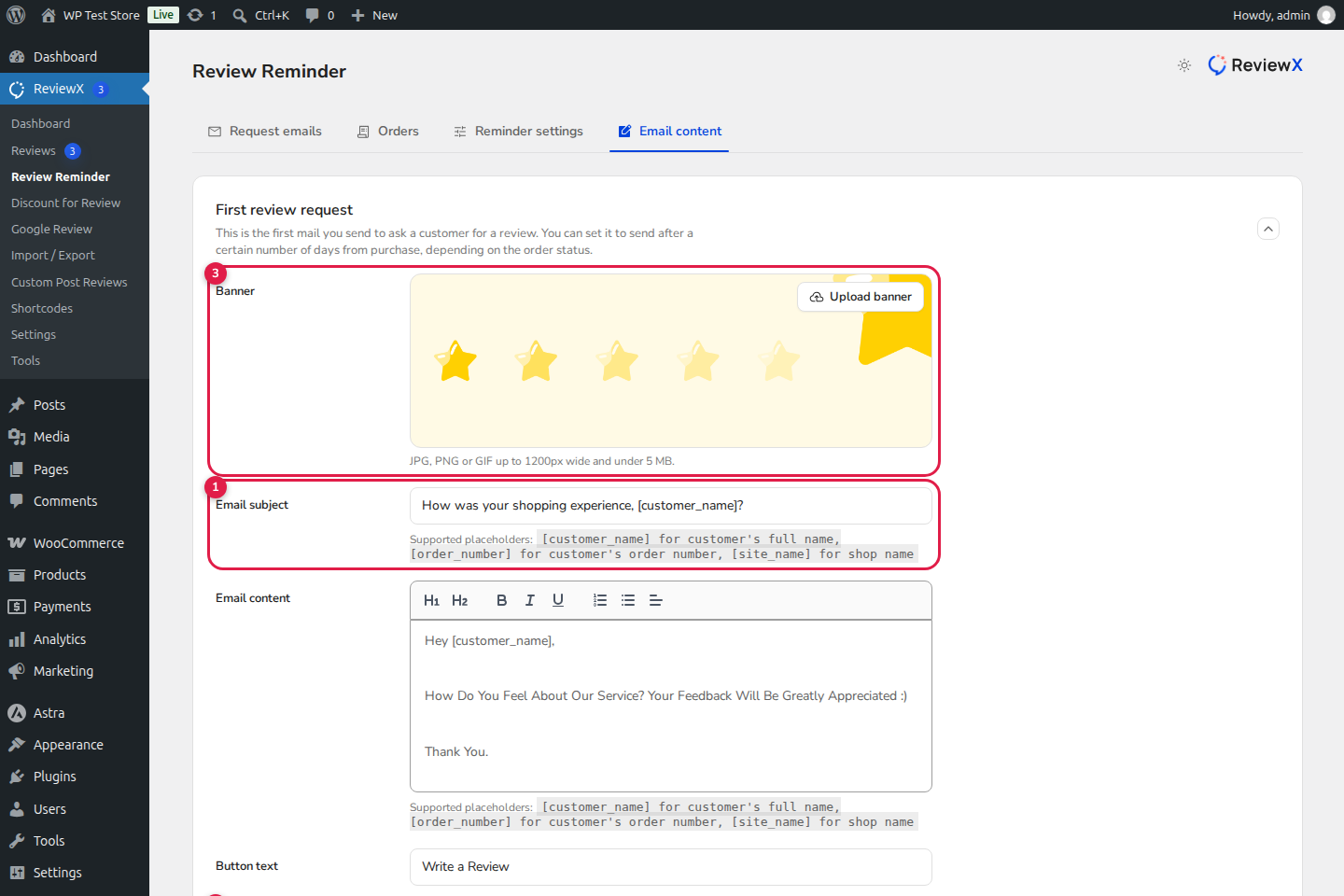
Figure 1: ReviewX Email Template Editor displaying: (1) Subject with merge tags, (2) Rich content editor, (3) Custom banner upload, and (4) Test email and Save actions.
Effective Email Copy Templates Using Merge Tags
Template 1: Friendly Post-Purchase Check-In (First Request)
Subject: Hi [customer_name], how are you enjoying your purchase from [site_name]?
Body:
Dear
[customer_name],Thank you again for your recent order
[order_number]with[site_name]! We hope your items arrived safely and exceeded your expectations.Could you take 60 seconds to share your honest feedback? Your thoughts help other shoppers make informed decisions and help our small team continually improve.
Click the button below to leave your review:
Template 2: Urgent Follow-Up Request
Subject: Reminder: [customer_name], your feedback on order [order_number] matters to us!
Body:
Hi
[customer_name],We know you are busy, but we’d love to know how your recent experience with
[site_name]went. Whether you loved your item or had suggestions for improvement, we read every single submission!
Adding Custom Header Banners
ReviewX allows you to upload a branded email banner to reinforce store identity. For optimal rendering across desktop and mobile email clients:
- Supported Formats: JPG, PNG, or GIF.
- Maximum Width: 1200px (retina-ready).
- Maximum File Size: 5 MB.
Testing Your Placeholders Before Launch
Never send live emails without previewing them first! ReviewX includes an integrated test dispatcher:
- In the email editor drawer, click Send test mail.
- In the modal, provide your personal email address.
- ReviewX dispatches a test email replacing placeholders with sample preview data so you can verify formatting, fonts, and button alignment.
- Once satisfied, click Save to activate your customized template.


