


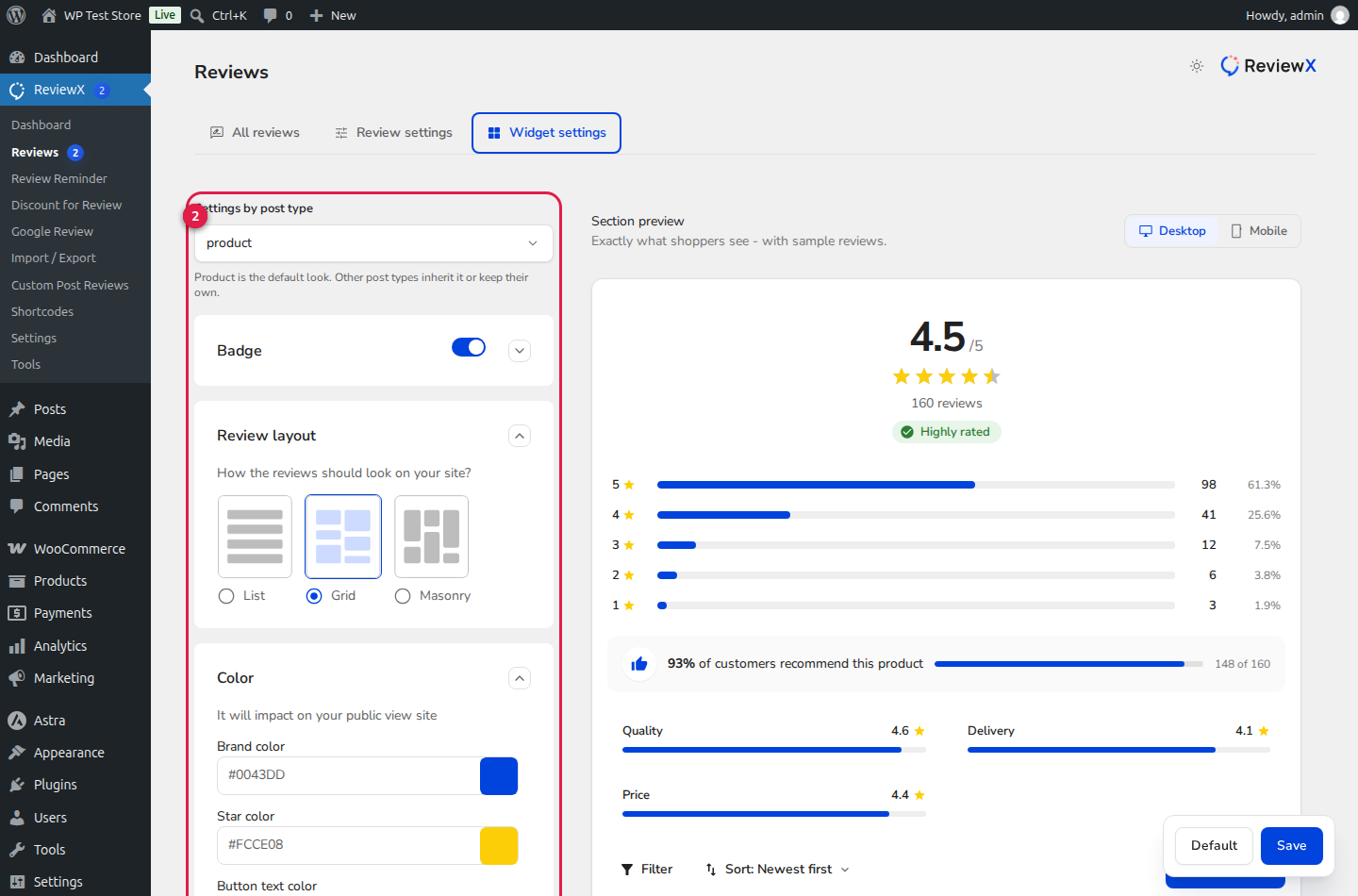
Your customer review section should look like a natural extension of your store’s branding rather than a generic third-party embed. ReviewX offers a comprehensive Widget Settings Designer that lets store owners configure rating star colors, brand highlight palettes, button styling, and layout structures (List, Grid, or Masonry) with real-time visual preview.
Custom Styling without Writing CSS
The ReviewX Widget Designer applies color tokens directly to CSS custom properties (variables), guaranteeing instant updates across all single product tabs, Gutenberg blocks, and Elementor widgets without theme bloat.
Selecting Storefront Review Layout Modes
ReviewX supports three primary structural layout formats (marked with Badge 1):
- List Layout (Default): Renders customer reviews sequentially in vertical cards. Ideal for long-form detailed reviews, multi-criteria breakdown bars, and products where shoppers read extended feedback.
- Grid Layout: Displays reviews in uniform, side-by-side columns. Perfect for visual eCommerce stores, lifestyle products, and quick-scan testimonials.
- Masonry Layout: Organizes review cards dynamically based on content height, preventing uneven whitespace when some customer reviews feature photos while others contain short text.
Configuring Brand & Star Color Palettes
To align the widget with your store’s color identity (marked with Badge 2):
- Navigate to
wp-admin → ReviewX → Reviewsand select the Widget settings tab. - Click to expand the Color disclosure accordion.
- Customize the color fields:
- Brand Color: Controls active accent elements, including verified buyer badges, recommendation percentages, progress bars, and pagination highlights.
- Star Color: Defines the fill color of active rating stars across both the summary graph and individual review cards (e.g.
#FFB800for classic gold). - Button Text Color: Sets the font color for primary action buttons such as Write a review, Filter, and Load more.
- Click Save to compile and update your store’s CSS stylesheets.
Per-Post-Type Widget Customization
ReviewX also supports distinct widget designs across different content types. In the Settings by post type dropdown, you can customize the review widget appearance for:
| Post Type | Inheritance Mode | Recommended Layout Style |
|---|---|---|
| WooCommerce Products | Global Default Look | List or Masonry with media attachments visible. |
| Courses / LMS | Independent Override | List layout emphasizing curriculum & instructor criteria. |
| Portfolio / Services | Independent Override | Grid layout featuring high-contrast testimonial cards. |


