


Page speed and Core Web Vitals (CWV)—specifically Largest Contentful Paint (LCP) and Interaction to Next Paint (INP)—directly affect organic search rankings and e-commerce conversions. Heavy review plugins that load bulky jQuery scripts, uncompressed image galleries, or un-cached database queries can degrade storefront performance. ReviewX is engineered from the ground up for blistering speed, utilizing a modern Alpine.js and Tailwind CSS reactive frontend paired with an intelligent multi-tier transient caching layer.
Zero jQuery Dependency & Native Inline SVGs
The ReviewX storefront widget contains zero jQuery dependencies. Icons are rendered as lightweight native inline SVGs, preventing external font icon network requests. Script payloads hydrate asynchronously via Alpine.js without blocking critical DOM rendering.
The Multi-Layered ReviewX Caching Engine
ReviewX employs three coordinated caching layers to deliver instant responses while keeping data perfectly accurate:
- Per-Product Aggregation Caching: Pre-calculated review counts, star rating distributions, and multi-criteria averages are stored in
wp_postmetaand transient cache. Loading a product page requires zero runtimeSQL COUNT()orAVG()queries. - Storefront First-Page Cache: The first page of reviews for every product is serialized into WordPress transients (
{product_id}_latest_reviews). When shoppers land on a product, the reviews render instantaneously without waiting for network roundtrips. - Browser Shared Fetch Session Storage: On the client side,
reviewx-storefront.jsutilizes a deduplicatedsharedFetchruntime cache. Multiple review widgets on the same page (such as tab reviews, summary badges, and sidebar stats) share a single API request rather than firing duplicate queries.
Managing Caches via ReviewX Tools
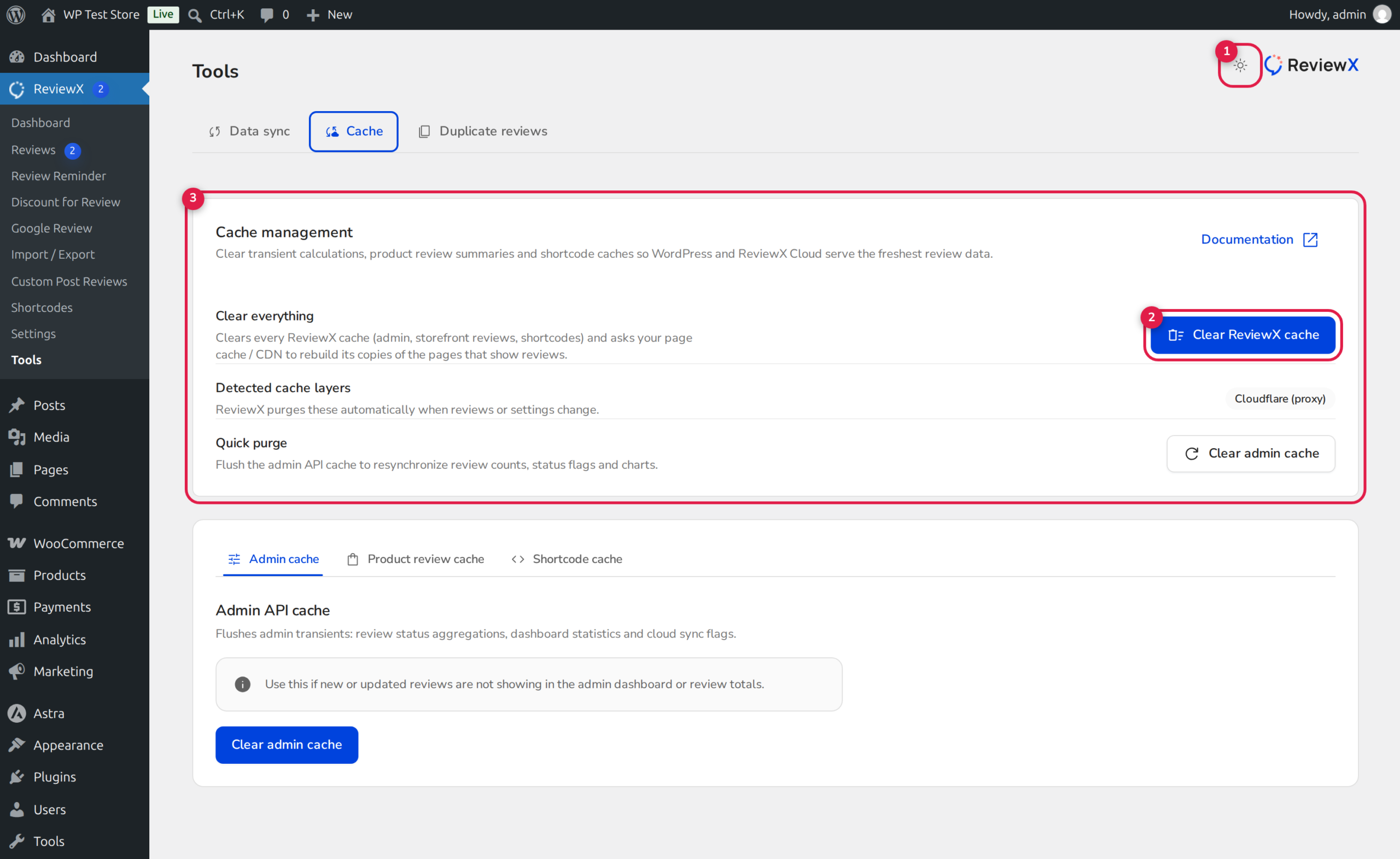
Step 1: Open the Tools Center
From your WordPress dashboard, navigate to ReviewX → Tools. Click on the Cache tab along the top navigation bar (marked with Badge 1).
Step 2: Inspect Cache Diagnostics
Review the cache diagnostic telemetry cards (Badge 3). The diagnostic panel displays total cached transients, per-post review memory utilization, and cache health status.
Step 3: Execute Targeted Cache Purges
Use the action buttons (Badge 2) to clear specific cache partitions when performing theme customizations or after manual database migrations:
- Clear All Cache: Flushes all sitewide review transients, product aggregations, and shortcode caches.
- Clear Product Cache: Clears only WooCommerce product review caches while preserving general configuration transients.
- Clear Shortcode Cache: Refreshes standalone custom shortcode data caches.
Compatibility with Caching & Optimization Plugins
ReviewX is pre-configured to work seamlessly alongside popular caching suites, including WP Rocket, LiteSpeed Cache, W3 Total Cache, and Cloudflare:
- CSS & JS Optimization: ReviewX storefront assets are safe to defer or minify. Because Alpine.js hydrates components declaratively, DOM scripts do not suffer from execution order race conditions.
- Removed Unused CSS (RUCSS) Safelisting: When using automated CSS tree-shaking tools, add
.rvx-storefrontand.rvx-storefront *to your CSS safelist so dynamically rendered modal classes remain intact. - Automated Cache Invalidation: Whenever a review is approved, edited, or deleted, ReviewX automatically invalidates both its internal transients and popular third-party page caches for that specific product.


