


Prospective customers frequently search for external validation on Google before completing a purchase on an online store. Displaying genuine, verified testimonials directly from your official Google Business Profile alongside your native WooCommerce product reviews significantly elevates brand trust, minimizes cart abandonment, and boosts conversion rates. ReviewX features a built-in Google Reviews Integration engine that automatically imports, synchronizes, and displays your Google Business reviews seamlessly across your site.
The Power of Unified Multi-Platform Social Proof
By consolidating both on-site WooCommerce product reviews and third-party Google Business reviews into a unified presentation, prospective buyers receive authentic third-party verification without needing to leave your checkout funnel.
Prerequisites for Google Reviews Integration
To connect your Google Business Profile to ReviewX, ensure you have:
- A verified Google Business Profile representing your company or e-commerce brand.
- A Google Places API Key generated from the Google Cloud Console with the Places API (New) enabled.
- Your unique Google Place ID identifying your exact physical or service-area business listing.
Step-by-Step Guide: Connecting Google Reviews in ReviewX
Step 1: Open the Google Review Management Center
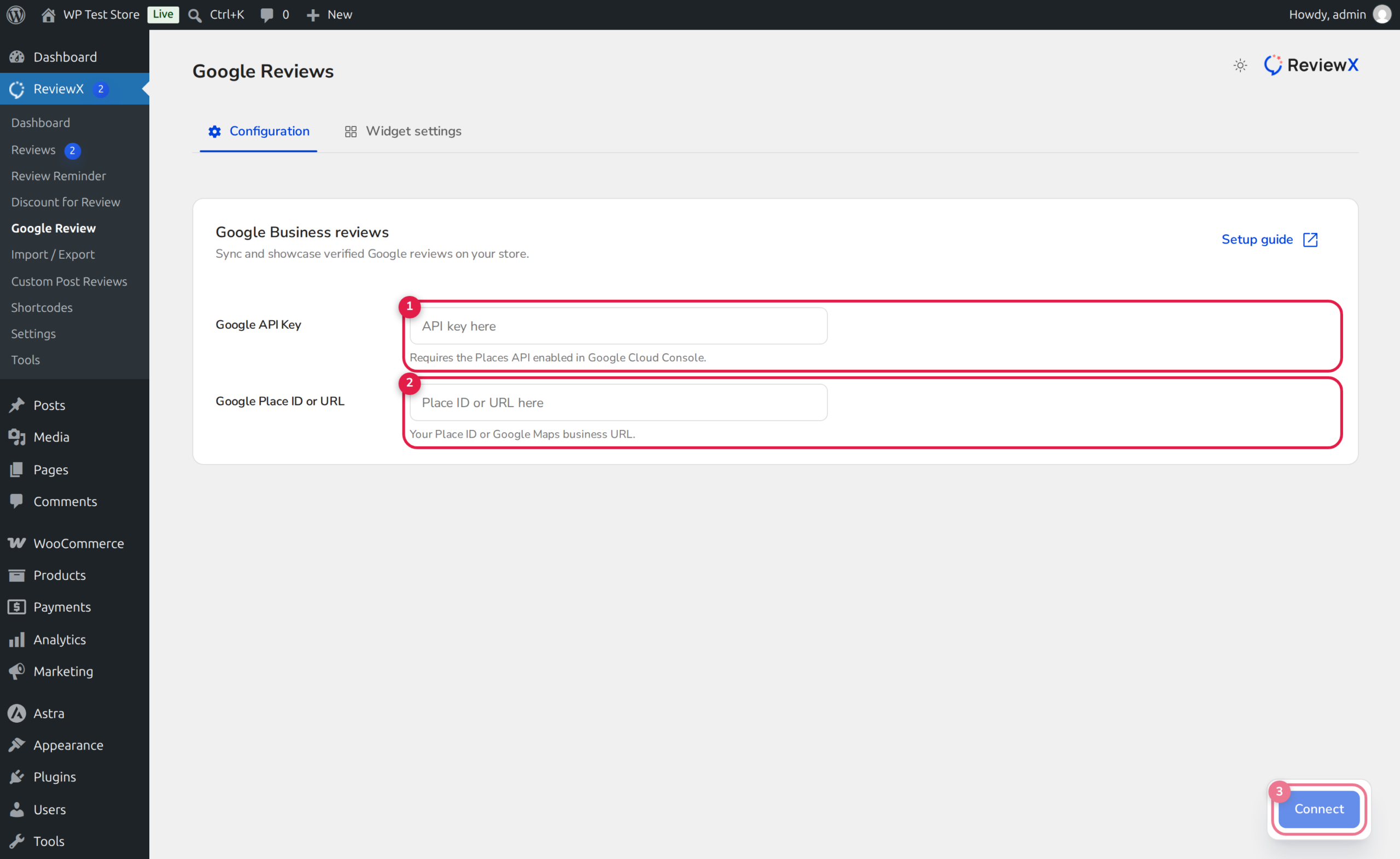
In your WordPress admin sidebar, navigate to ReviewX → Google Review. The interface defaults to the Configuration tab.
Step 2: Enter Your Google Places API Key
Locate the Google API Key input field (marked with Badge 1). Paste your active server or browser API key generated from Google Cloud Platform.
Step 3: Provide Your Google Place ID or URL
In the Google Place ID or URL field (Badge 2), enter your unique Place ID (e.g., ChIJN1t_tDeuEmsRUsoyG83frY4) or your public Google Maps business profile URL. ReviewX automatically resolves the Place ID from valid Maps URLs.
Step 4: Connect & Synchronize
Click the Connect button (Badge 3). ReviewX securely validates the credentials with Google’s Places API, verifies business ownership metadata, and fetches your latest five-star and customer testimonials into the ReviewX local cache.
Displaying Google Reviews on Your Storefront
Once connected, you can display Google reviews across your site using multiple flexible methods:
- Dedicated Shortcode: Insert
[rvx-google-reviews]into any page, post, or widget area to display a curated grid or carousel of Google testimonials. - Native Gutenberg Block: In the WordPress block editor, insert the ReviewX Google Reviews block and customize star ratings, review limits, and layout skins in the block inspector.
- Elementor & Divi Builders: Drag and drop the native ReviewX Google Reviews widget into your Elementor or Divi page layouts.
Automated Intelligent Caching
To protect your store from Google Cloud API rate limits and unexpected billing overages, ReviewX caches imported Google reviews in WordPress transients. Reviews refresh periodically in the background rather than initiating a new Google API request on every visitor page load.


