


Maintaining an active stream of fresh, user-generated content is vital for e-commerce conversion rates. However, manually reviewing and approving every incoming customer feedback can quickly become a significant administrative bottleneck as your order volume expands. ReviewX offers a high-performance Review Auto Approval engine that automatically publishes legitimate customer submissions instantly to your storefront widget while keeping spam securely filtered.
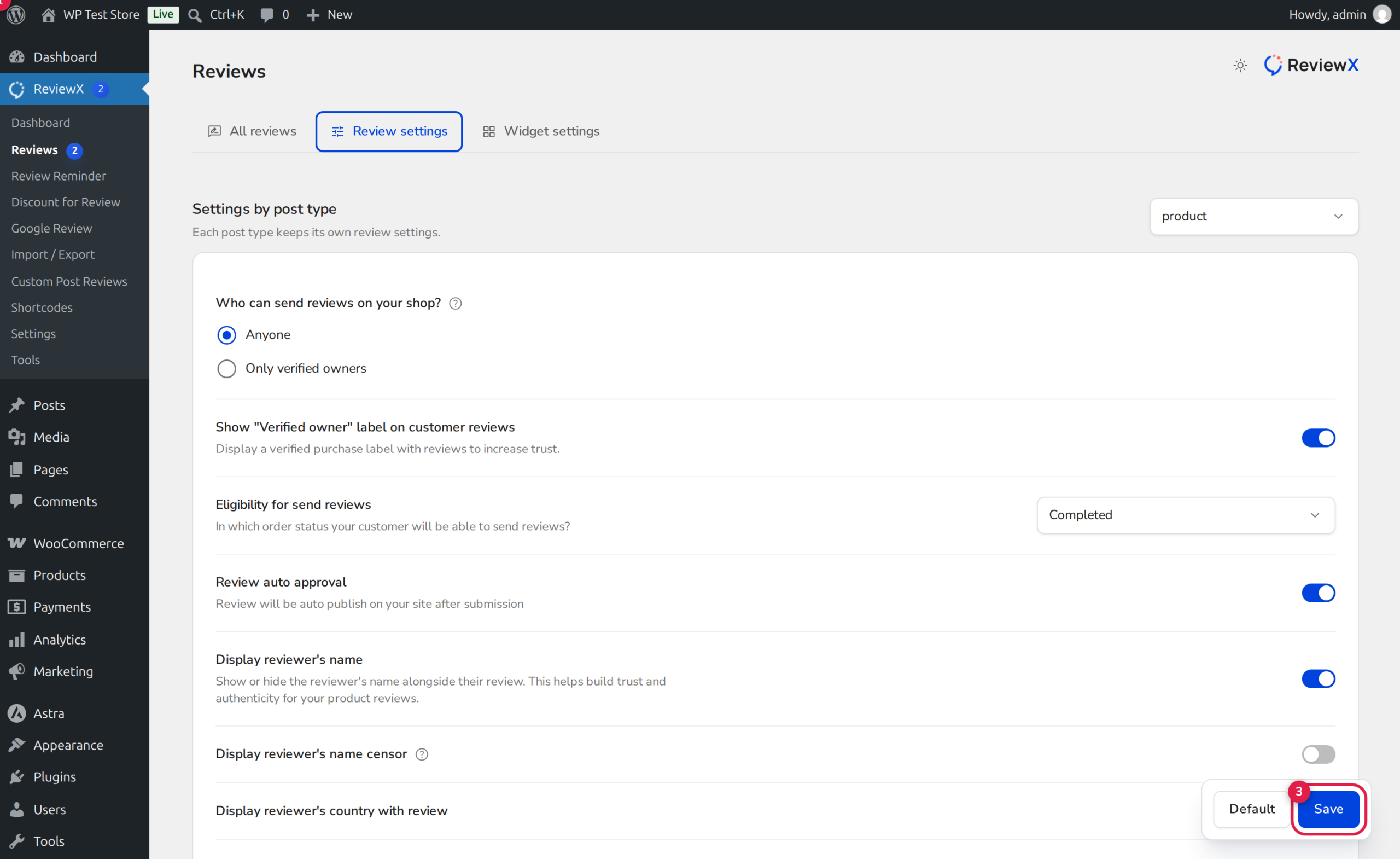
Balancing Social Proof and Spam Protection
Instant review publishing provides shoppers with immediate gratification and encourages genuine engagement. To maintain store integrity while auto-approval is enabled, pair this setting with Only verified owners submission policy and active reCAPTCHA bot protection.
How the Auto-Approval Pipeline Works Under the Hood
When a shopper submits a product review through the storefront Alpine widget or via an automated review reminder link, ReviewX processes the feedback through its moderation controller:
- Moderation Evaluation: ReviewX inspects the site setting
auto_approve_reviewsstored in the global configuration repository. - Status Assignment: If auto-approval is enabled, the review record is created with
comment_approved = 1(published). If disabled, it is flagged ascomment_approved = 0(pending moderation) and queued for merchant review. - Automated Cache Flush: Upon instant approval, ReviewX immediately increments product review aggregations, updates rating statistics, and invalidates the cached storefront widget payload so prospective buyers see the new review immediately without page caching delays.
- Incentive Delivery: If automated discount incentives are active, successful auto-approval immediately triggers the delivery of the promised coupon code to the reviewer’s inbox.
Step-by-Step Guide: Enabling Review Auto-Approval
Step 1: Open Review Settings
In your WordPress admin dashboard, navigate to ReviewX → Reviews. Click on the Review settings tab located along the top navigation bar.
Step 2: Locate the Auto Approval Setting
Scroll down to the moderation section to locate Review auto approval (marked with Badge 1 in the screenshot above). The descriptive subtext clarifies: “Review will be auto publish on your site after submission.”
Step 3: Activate the Auto-Publish Toggle
Toggle the switch switch to active (Badge 2). When active, all incoming reviews bypassing fraud barriers will publish live to the storefront immediately without requiring manual merchant approval.
Step 4: Save Configuration
Scroll to the bottom of the settings pane and click the Save button (Badge 3). Your new moderation policy takes effect immediately for all subsequent review submissions.
Recommended Moderation Configurations
| Store Profile | Auto-Approval Setting | Submission Policy | Recommended Security |
|---|---|---|---|
| High-Volume Store | Enabled | Only verified owners | reCAPTCHA v3 + Cloudflare Turnstile |
| Open / Community Store | Disabled (Manual) | Anyone | Math Captcha + Bad Words Filtering |
| Luxury / Regulated Products | Disabled (Manual) | Only verified owners | Manual Compliance Review |
Need to Moderate High-Risk Reviews?
Even with auto-approval enabled, you can still view, unpublish, trash, or edit any published review at any time from ReviewX → Reviews → All reviews. Reviews flagged as spam by automated bot filters remain segregated in the Spam tab regardless of auto-approval status.


