


One of the hallmark features of ReviewX is its multi-criteria review system. Rather than restricting customers to a single generic 1-to-5 star rating, ReviewX lets you break down the evaluation into tangible, product-specific qualitative criteria. When managing multiple Custom Post Types (such as Courses, Books, Services, or Event Venues), each content type demands its own unique set of rating benchmarks.
This guide explains how to design, configure, and assign distinct review criteria for each post type on your WordPress site.
Why Customize Criteria Per Post Type?
A single rating dimension fails to capture the true value of diverse offerings. Evaluating a physical product is fundamentally different from reviewing an online masterclass or a hotel accommodation:
| Post Type | Typical Review Dimensions | Customer Value |
|---|---|---|
| Online Course (LMS) | Content Quality, Instructor Clarity, Practical Exercises, Value for Money | Helps students gauge curriculum rigor and teaching effectiveness. |
| Book / Publication | Writing Style, Pacing, Depth of Research, Re-readability | Offers readers literary perspective before purchase. |
| Hospitality / Property | Cleanliness, Location Convenience, Amenities, Host Communication | Builds trust regarding physical accommodation quality. |
| Freelance / Agency Service | Turnaround Speed, Communication, Technical Expertise, Cost Efficiency | Validates professional reliability for corporate prospects. |
Configuring Multi-Criteria in ReviewX
To configure multi-criteria ratings across your store and post types:
- Navigate to ReviewX → Settings → Review Settings.
- Scroll down to the Multi-criteria reviews card.
- Toggle the switch to Enabled.
- Review the criteria list. By default, ReviewX provides popular benchmarks, but you can customize the labels or add specialized criteria to match your business model.
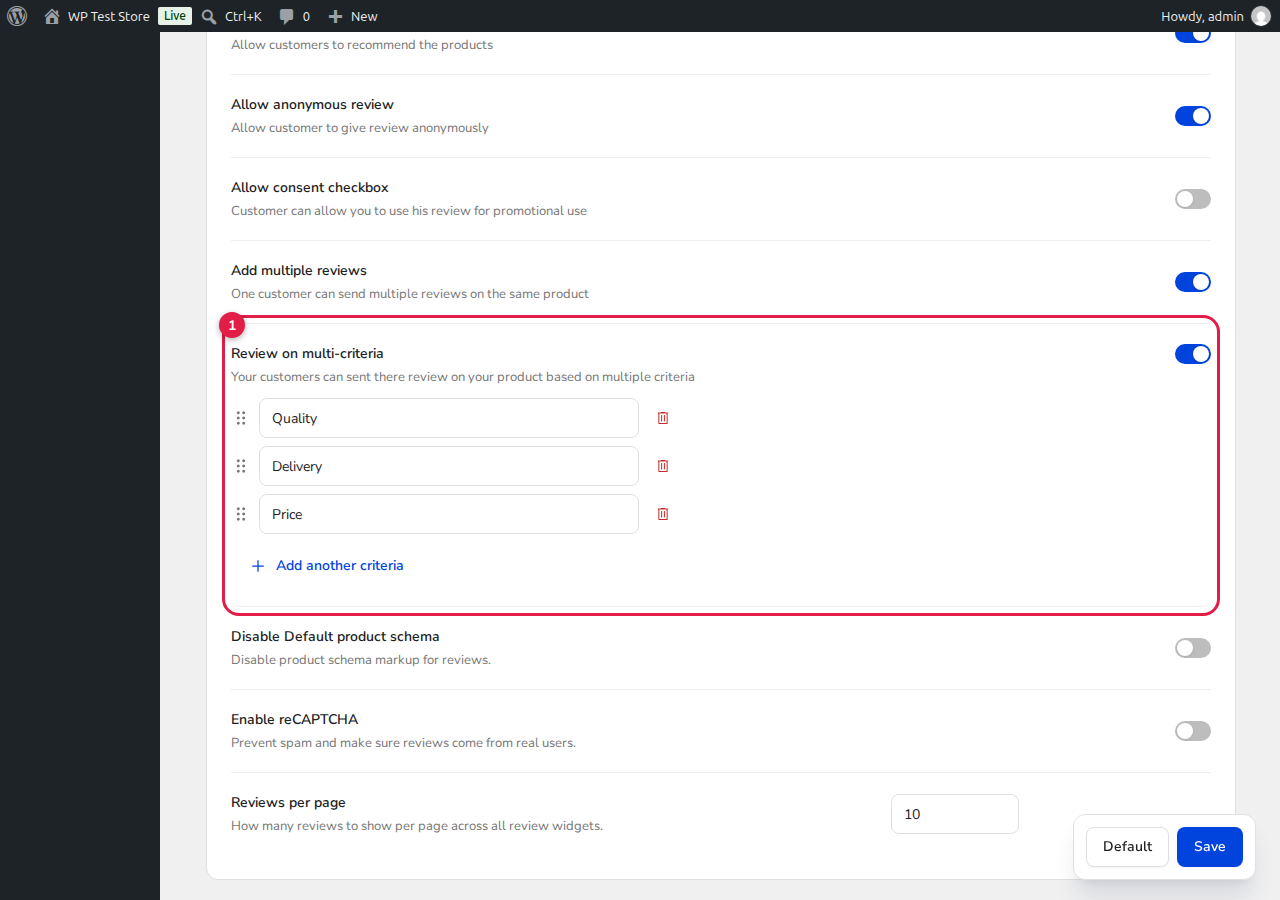
Figure 1: ReviewX Multi-Criteria settings card allowing granular rating dimensions.
How Multi-Criteria Ratings Work on the Frontend
When multi-criteria is enabled for a post type, the review submission form dynamically renders individual star selectors or interactive rating sliders for each configured dimension. Reviewers can assign separate ratings to each criterion.
ReviewX automatically computes:
- Individual Criteria Averages: The aggregate mean score for each specific criterion across all verified reviews.
- Overall Rating: The composite arithmetic mean displayed in the summary badge and rich snippet schema.

Figure 2: Frontend criteria graph rendering individual progress bars for each evaluation benchmark.
Displaying the Criteria Breakdown on CPTs
To display the multi-criteria breakdown progress bars on any single custom post type template, use the specialized ReviewX shortcode:
[rvx-criteria-graph]If you wish to display the criteria graph for a specific post on a landing page or comparison matrix, pass the post ID attribute:
[rvx-criteria-graph post_id="482"]Best Practices for Multi-Criteria Setup
- Keep it Between 3 and 5 Criteria: Having too few criteria misses nuance, while having more than 5 increases cognitive friction and causes form abandonment.
- Use Clear, Unambiguous Labels: Avoid internal jargon. Use words that customers intuitively understand when judging quality.
- Combine with Photo Reviews: Pair multi-criteria reviews with visual evidence by enabling Allow photo reviews in your CPT setup for maximum authenticity.


