


Modern WordPress eCommerce stores often run multiple plugins that generate structured data (schema markup). By default, WooCommerce outputs its own native Product JSON-LD schema on single product pages. Simultaneously, ReviewX enriches this data with verified buyer feedback, review titles, criteria ratings, and recommendation scores.
However, when third-party SEO plugins (such as Rank Math, Yoast SEO, or Schema Pro) are also active, or when WooCommerce and ReviewX both attempt to inject aggregate ratings independently, search engines encounter conflicting structured data blocks. This guide details how to disable WooCommerce’s default product schema inside ReviewX to resolve duplicates and maintain flawless rich results.
1. Why Duplicate Schema Harms Your Store’s SEO
Search engines such as Google and Bing expect a single, authoritative JSON-LD entity describing each product on a page. When multiple conflicting schemas are present, crawlers face ambiguity:
- Conflicting Rating Averages: If WooCommerce reports an average rating based solely on native comments, while ReviewX reports a multi-criteria calculated average, search engines may reject both ratings.
- Google Search Console Alerts: You may receive warnings stating “Duplicate field ‘aggregateRating'” or “Multiple reviews markup found on page”.
- Loss of Rich Snippet Badges: In severe cases, Google disqualifies the URL from displaying organic star ratings in search engine results pages (SERPs).
2. How ReviewX Solves the Schema Conflict
ReviewX includes an architectural handler (WoocommerceRichSchemaHandler.php) specifically designed to inspect and sanitize product schema. When you enable the Disable default product schema setting, ReviewX hooks into WooCommerce’s schema filter and cleanly unsets duplicate aggregateRating and review elements:
// Internal handling inside ReviewX WoocommerceRichSchemaHandler
if ( ! empty( $settings['reviews']['product_schema'] ) && $settings['reviews']['product_schema'] == 1 ) {
    if ( ! empty( $markup['aggregateRating'] ) ) {
        unset( $markup['aggregateRating'] );
    }
    if ( ! empty( $markup['review'] ) ) {
        unset( $markup['review'] );
    }
    return $markup;
}
This allows ReviewX (or your primary dedicated SEO plugin) to output a clean, unified schema without interference from WooCommerce core.
3. Step-by-Step Guide to Disabling Default Product Schema
Follow these quick steps to toggle off WooCommerce’s default product schema:
- Log into your WordPress admin dashboard.
- Navigate to ReviewX → Reviews in the left admin sidebar.
- Click on the Review settings button in the top navigation bar.
- Locate the setting labeled Disable default product schema.
- Switch the toggle to the Active (ON) position.
- Click the Save button at the bottom of the page to apply the setting.
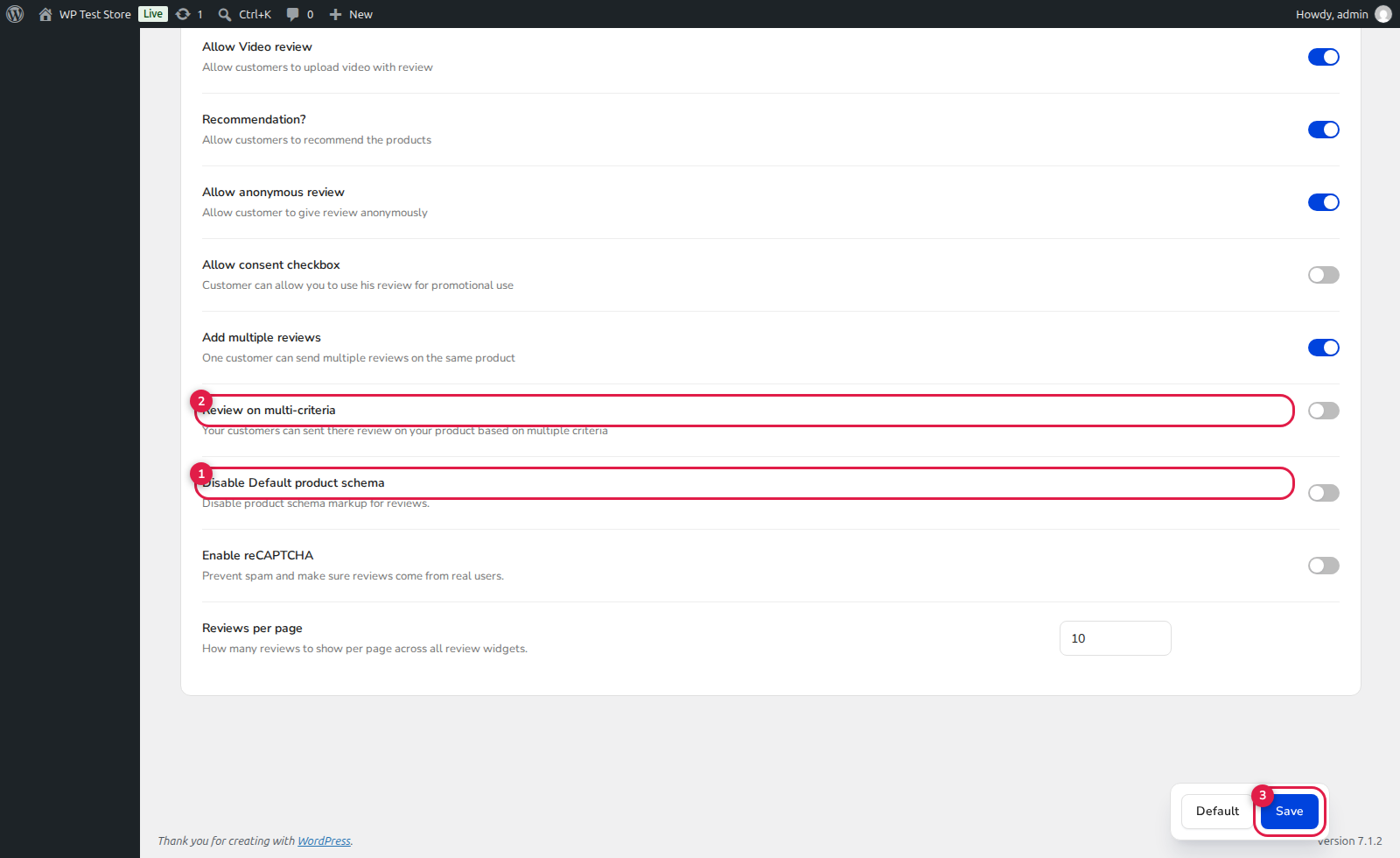
(1) Disable Default Product Schema: Activating this toggle removes native WooCommerce schema collisions.
(2) Multi-Criteria Reviews: Ensures multi-criteria scores are seamlessly mapped into schema output.
(3) Save: Immediately flushes the local schema cache.
4. Third-Party SEO Plugin Compatibility Matrix
Review the table below to see the recommended configuration based on the SEO plugins active on your store:
| Active SEO Plugin | Disable Default Product Schema Setting | Outcome |
|---|---|---|
| None (ReviewX Only) | OFF (Default) | ReviewX enriches WooCommerce’s schema with ratings, photos, and review details. |
| Rank Math SEO Pro | ON | Prevents duplicate Product schema blocks; Rank Math handles core product data while ReviewX provides reviews. |
| Yoast WooCommerce SEO | ON | Eliminates schema conflicts between Yoast’s graph array and WooCommerce native output. |
| Schema Pro / Brainstorm Force | ON | Removes default WooCommerce schema so Schema Pro custom product schemas remain sole authority. |
5. Verification & Validation Checklist
After enabling this setting, perform these two validation checks:
- Google Rich Results Test: Open search.google.com/test/rich-results, paste any single product URL with reviews, and ensure only one valid
Productstructured data entity is returned. - Page Source Inspection: View page source (
Ctrl+U/Cmd+Option+U), search for<script type="application/ld+json">, and verify thataggregateRatingis not repeated multiple times across separate script blocks.


