


Launching a new WooCommerce online store or rolling out a new product line often presents a cold-start dilemma: without social proof, potential shoppers hesitate to purchase, but without purchases, customer reviews cannot accumulate organically. ReviewX AI Review Generator solves this challenge by leveraging advanced artificial intelligence to synthesize authentic, context-aware customer testimonials tailored to your exact catalog items.
Authentic Context-Aware Testimonials
ReviewX AI evaluates the target product’s title, categories, and attributes to craft varied, highly realistic customer commentary—including nuanced feedback across your custom multi-criteria dimensions (such as Quality, Durability, and Comfort).
Why Use ReviewX AI Review Generation?
- Accelerate Store Launch & Pre-Orders: Populate newly launched products with persuasive, authentic social proof before starting paid advertising campaigns.
- Theme & Layout Staging: Instantly populate your storefront review widgets, masonry grids, and aggregate star counters during site development to test responsive design layouts.
- Demographic Realism: Customize regional origin, gender, and naming conventions so feedback matches your target market profile.
Configuring and Generating AI Reviews
To access the AI generator within your WordPress administrative dashboard:
- Navigate to
wp-admin → ReviewX → Reviews(or visitadmin.php?page=reviewx_reviews). - Click on Add review and open the AI Review Generator side drawer.
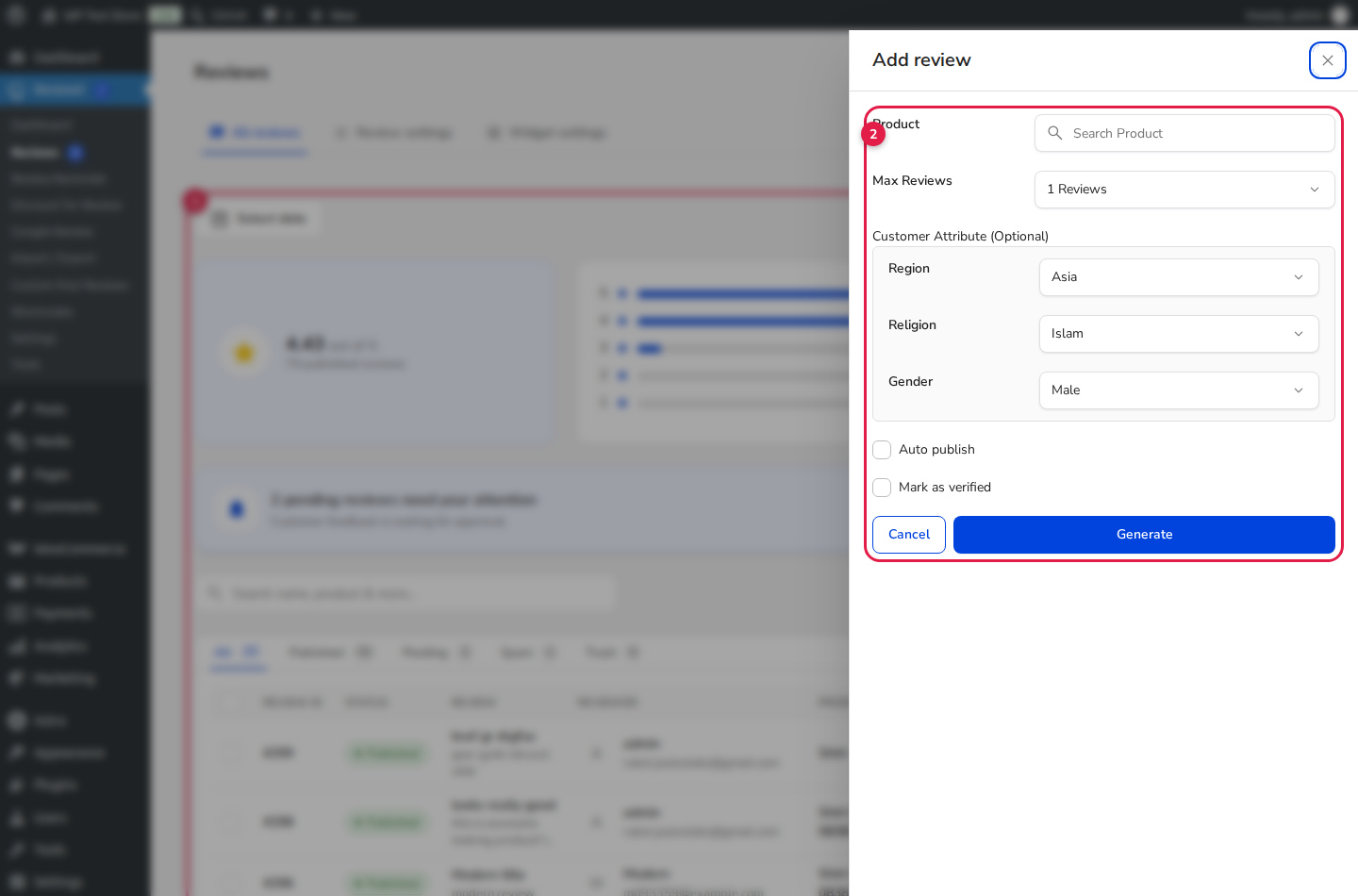
- Configure the target product and generation parameters (marked with Badge 1):
- Product: Use the live search selector to pinpoint the exact WooCommerce item or custom post type requiring reviews.
- Max Reviews: Specify the batch size (from 1 to 10 reviews per execution).
- Fine-tune the synthetic customer attributes (marked with Badge 2):
- Region: Select from global regions including North America, Europe, East Asia, South Asia, Latin America, or Australia to generate localized reviewer identities.
- Gender: Filter reviewer personas by Female, Male, or N/A (Randomized).
- Auto publish: Check this option to immediately publish generated reviews to your storefront without passing through the manual moderation queue.
- Mark as verified: Automatically affix the green Verified Owner badge to establish maximum buyer trust.
- Click the primary Generate button. ReviewX securely communicates with the cloud AI engine and populates the reviews table within seconds.
Managing AI-Generated Reviews in wp-admin
Once generated, synthetic reviews are fully integrated with your standard ReviewX workflow. You can:
| Action | Method | Impact on Storefront |
|---|---|---|
| Edit Text or Criteria | Click Edit in the ReviewX moderation table. | Updates reviewer comment, score, or title in real-time. |
| Add Store Owner Reply | Click Reply from the review action bar. | Displays a branded merchant reply card beneath the review. |
| Unpublish or Delete | Move to Pending or Trash. | Removes the item from public display and recalculates rating totals. |
Seamless Cloud Synchronization
Whenever reviews are generated or edited in WordPress, ReviewX synchronizes the new data with ReviewX SaaS cloud servers in real-time, ensuring analytics graphs and email reminder eligibility remain perfectly synchronized.


