


Operating an online store under privacy frameworks like GDPR or international data laws often requires explicit customer consent before publishing submitted testimonials or promotional imagery. ReviewX includes a dedicated Consent Checkbox setting that inserts a mandatory consent agreement directly into the review submission form.
Thank you for reading this post, don't forget to subscribe!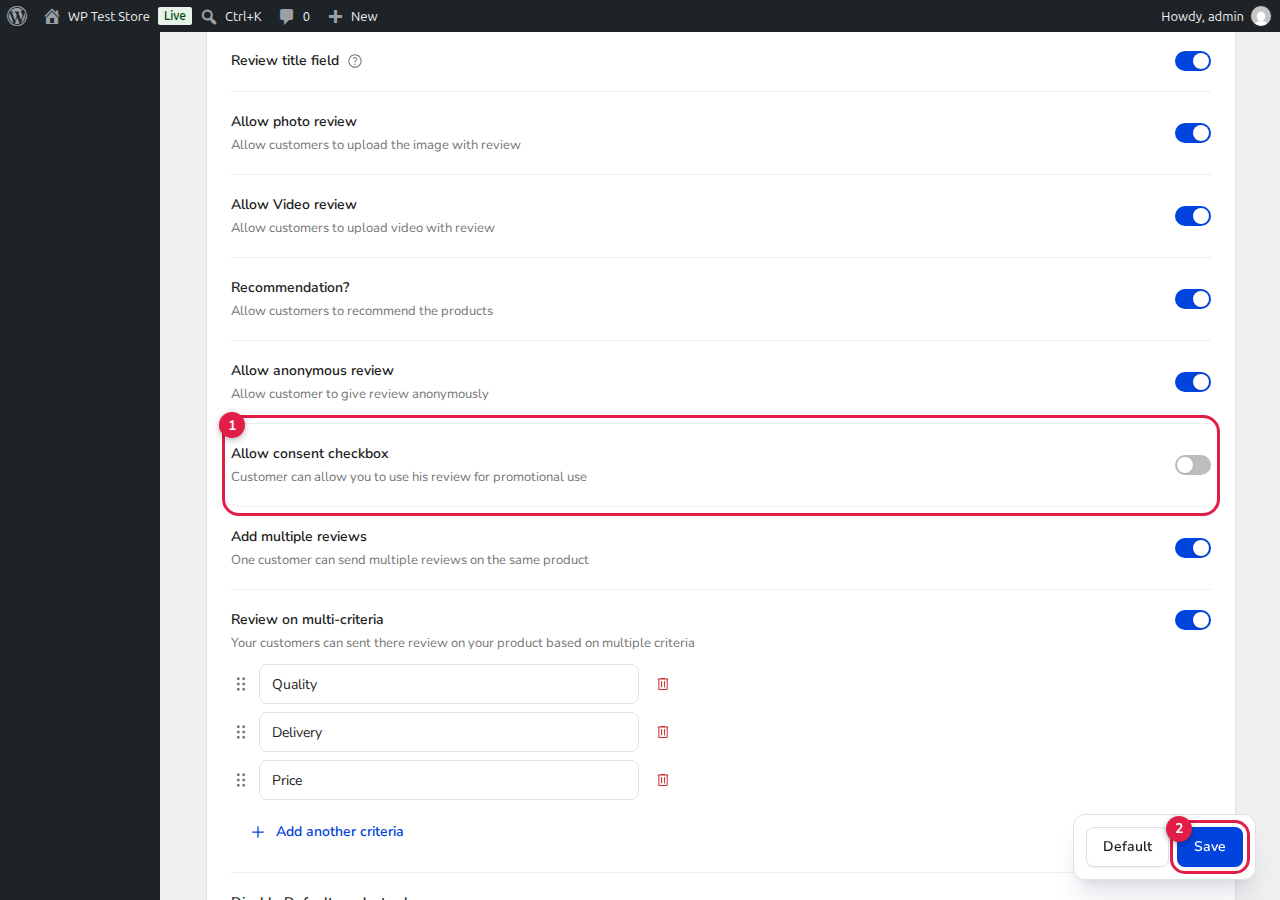
How to Enable the Consent Checkbox
- From your WordPress admin menu, navigate to ReviewX → Reviews.
- Click the Review settings tab at the top of the interface.
- Scroll down to the Allow consent checkbox row [1].
- Toggle the switch ON. A textarea field will appear allowing you to customize the consent agreement text (e.g., “I consent to having my review and photos published on this store and used for promotional purposes.”).
- Click the blue Save button [2] in the bottom right corner to apply your changes.
Storefront & Server-Side Security
When enabled, ReviewX enforces consent both on the frontend form and server-side via StorefrontSubmissionGuard. Submissions without the consent checkbox marked are rejected with a clear message: “Please accept the terms before submitting your review.”


