


Unlike standard WooCommerce products which possess native template hooks and tab structures (such as woocommerce_after_single_product_summary), WordPress Custom Post Types (CPTs) rely on custom templates created in Gutenberg (Full Site Editing), Elementor Theme Builder, Divi, or your child theme’s PHP files.
ReviewX provides a modular suite of shortcodes and template tags designed to embed review collection forms, verified review lists, graphical summaries, and aggregate star ratings anywhere on your single CPT layouts.
ReviewX Modular Shortcode Suite
ReviewX separates review functionality into distinct components so you can construct the exact layout your design demands:
| Shortcode | Rendered Component | Best Placement |
|---|---|---|
[rvx-woo-reviews] |
Complete Review System (Summary Graph + Form + Reviews List) | Bottom of single CPT template in a dedicated “Reviews & Ratings” section. |
[rvx-review-form] |
Standalone Review Submission Form (Ratings, Criteria, Photo/Video Upload) | Dedicated modal popup or sidebar submission widget. |
[rvx-review-list] |
Verified Customer Reviews List with Pagination, Sorting, and Filters | Main content column of single post layout. |
[rvx-summary-graph] |
Star Distribution Graph (Percentage breakdown from 5 stars to 1 star) | Sidebar overview or header rating showcase. |
[rvx-criteria-graph] |
Multi-Criteria Breakdown Progress Bars | Directly beside the summary graph. |
[rvx-star-count] |
Compact Star Rating & Total Count Badge | Post header beneath title or CPT archive card. |
Visual Preview of Embedded Components
Verified Reviews List
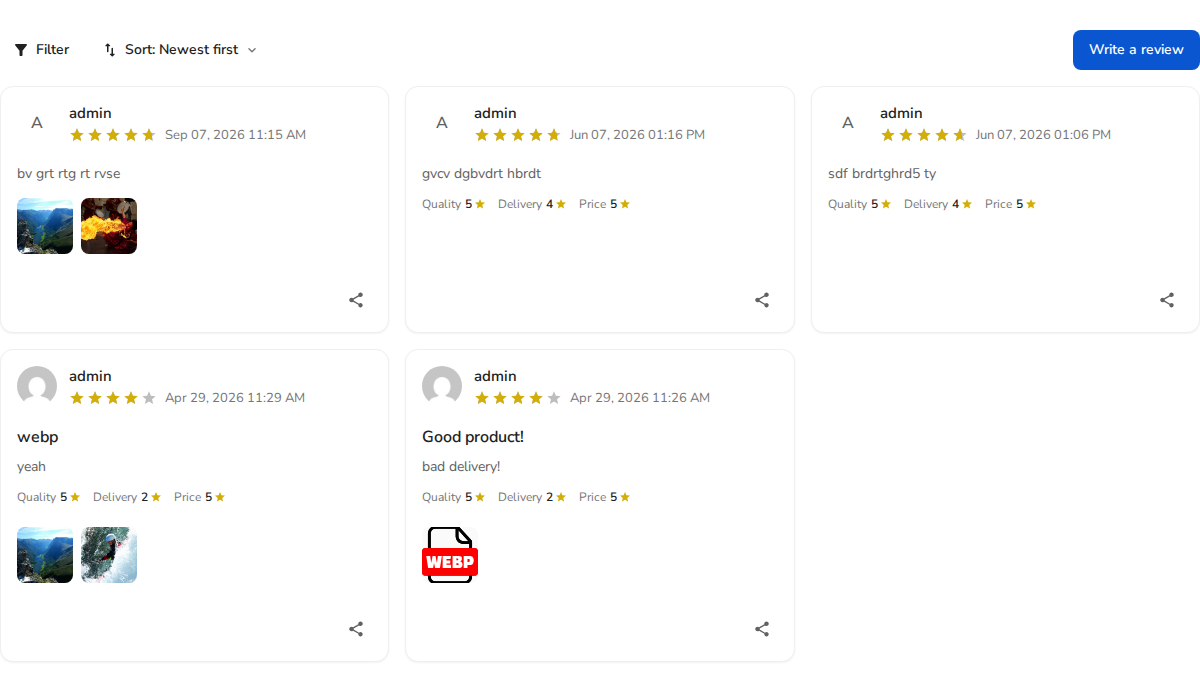
[rvx-review-list]: Displays customer reviews with media gallery and helpful voting.
Review Submission Form
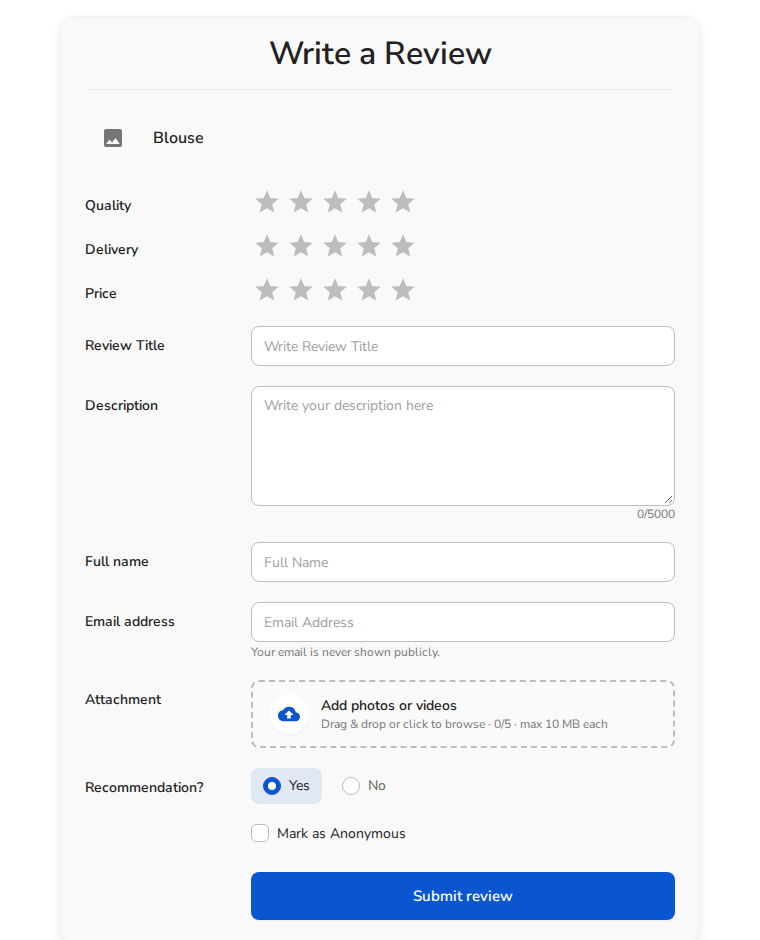
[rvx-review-form]: Interactive submission form with stars, criteria, and image uploads.
Integration Method 1: Using Gutenberg Block Editor / Full Site Editing (FSE)
- Open the single template for your custom post type in the WordPress Site Editor (or edit an individual post).
- Click the + (Add block) icon and insert a Shortcode block.
- Enter
[rvx-woo-reviews]. - Save and publish your template. When viewing any post of this post type on the frontend, ReviewX automatically inherits the post ID and renders the full review ecosystem.
Integration Method 2: Elementor Theme Builder
- Navigate to Templates → Theme Builder in your WordPress admin.
- Edit your Single Post or Single CPT template with Elementor.
- Drag the Shortcode widget into the desired section of your canvas.
- In the widget settings panel, paste:
[rvx-woo-reviews] - Click Update and assign the display condition to your specific Custom Post Type (e.g. Include > Courses > All).
Integration Method 3: PHP Child Theme Template
If your site uses a traditional PHP-based WordPress theme, you can embed ReviewX directly inside your template file (e.g., single-course.php or single-property.php) right inside the WordPress Loop:
<?php
// Inside the single post loop
if ( shortcode_exists( 'rvx-woo-reviews' ) ) {
    echo do_shortcode( '[rvx-woo-reviews]' );
}
?>
Pro-Tip: Dynamic Post ID Detection: When ReviewX shortcodes are placed inside a single template without an explicit
post_idattribute, they automatically detect and bind to the active WordPress global post. If you need to embed reviews for a specific item on a promotional landing page, simply specify the attribute:[rvx-woo-reviews post_id="104"].


